|

|
Processed through Paypal No account required. |








Buy our over-priced crap to help pay the bills.



|
|
Processed through Paypal No account required. |
| Files | ||||
| File Name | Rating | Downloads | ||
 |
File Order Randomizer v1.0 File Order Randomizer v1.0 👉 Adds random numbers to the start of filenames to randomize play order on simple music players. File Order Randomizer is a small, portable utility intended for devices (like some car radios or clock radios) that cannot play tracks in random order from a USB stick. It generates random numbers and puts them in front of every file in a specified folder, so you can create a new play order by running it again. Features: • Adds random numbers in front of filenames in a selected folder • Designed to help create a “random” track order for cheap/basic music players using USB media • Simple run-to-rerandomize workflow (run again whenever you want a new order) Supported operating systems: • Windows 2000 SP4 • Windows XP • Windows Vista • Windows 7 • Windows 8 / 8.1 • Windows 10 • Windows 11 Supported languages: • English Click here to visit the author's website. |
 |
798 | Jun 29, 2026 Lumpiluk 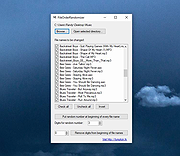 |
|
foobar2000 v2.26 foobar2000 v2.26 👉 Advanced freeware audio player with tagging, conversion, replay gain, and customizable playback features. foobar2000 is an advanced freeware audio player designed for playing mainstream audio formats out of the box, with support for additional decoder components, gapless playback, advanced tagging, Audio CD ripping, transcoding, ReplayGain, internet radio, customizable keyboard shortcuts, and a flexible component architecture for extending functionality. Features: • Plays all mainstream audio formats out of the box • Supports additional decoder components for more formats • Gapless playback • Stream music on your local network • Easily customizable user interface layout • Advanced tagging capabilities • Audio CD ripping and audio transcoding • Full ReplayGain support • Customizable keyboard shortcuts • Built-in DSP effects with support for more through components • Internet radio support • Open component architecture for third-party extensions • No telemetry or data collection Supported operating systems: • Windows 7 or newer • macOS 11 Big Sur or newer Supported languages: • English Changes: v2.26 06-26-26 Converter changes New preset format, presets stored as .ini files in profile subfolder. Old presets imported on first run. Better error messages when receiving unexpected data format change in mid-conversion; made discard blank chunks before checking for format match. Added extensible post-conversion actions which can be used for ReplayGain scanning, integrity testing, etc. On conversion error, encoder's stderr output is forwarded to foobar2000 console. Ogg chaining is now off by default, Ogg chapters written by default instead. Added %source_list_index% & %source_list_total%, only for multi track image naming pattern use, to allow use of list indexes in the pattern. Made file name preview recognize newly added %source_list_index%. Made show output of command-line encoder program in error popup if conversion has failed. Made "no DSP reset" explicitly shown in overview, as ... |
|
6,754 | Oct 05, 2026 foobar2000.org 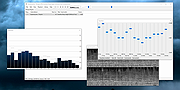 |
 |
Pocket Radio Player v250414 Pocket Radio Player v250414 👉 A lightweight portable internet radio player for streaming thousands of stations worldwide. Pocket Radio Player is a compact and portable internet radio application that lets you listen to online radio stations from around the world without installation. Designed to be fast and resource-friendly, it runs directly from its executable and stores all settings locally, making it ideal for USB drives or use on multiple systems. Despite its small size, it offers powerful station management, recording capabilities, and customizable playback options in a clean, straightforward interface. Features: • Portable application with no installation required • Streams thousands of online radio stations • Record live radio streams to MP3 files • Customizable station lists and favorites • Built-in search and filtering for stations • Supports multiple audio formats and streaming protocols • Minimal CPU and memory usage • Command line support for advanced users Supported operating systems: • Windows 7, Windows 8, Windows 10, Windows 11 Supported languages: English, German, Spanish, French, Italian, Portuguese, Russian, Polish, Dutch Changes: v240113 01-13-24 Updated station list and minor improvements. Note: This file has four hits on VirusTotal. We have confirmed these to be false positives. The file is safe. |
|
11,820 | Jun 27, 2026 Stefan Sarbok 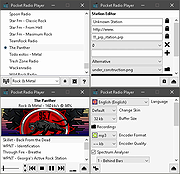 |
|
Radio Ripper (PORTABLE) 3.1 Radio Ripper (PORTABLE) 3.1 Radio Ripper is a small app that lets you listen to and record music from tens of thousands of free internet radio stations worldwide, that serve up everything from jazz, rock, classical and country to new age, Bollywood and disco. Recorded songs can be copied to other devices such as iPods, phones, tablets, etc. How do I use it? To find a radio station: Click Stations | Search or Stations | By Genre. Select a station from the list and download the station's playlist (.asx, .m3u, .pls, .ram or .xspf) file. Click Open | Playlist File to open the file you downloaded. To play a station, do any of the following: Click Open | Playlist File to open a playlist file (or just drag the file on to Radio Ripper). Click Random Station to play a random station. Click Stations | Favorites to play a favorite station. Click Stations | Recently Played to play a recently played station. If you like the station you're listening to, click Add To Favorites to add it to your list of favorites. To listen to a favorite station, click Stations | Favorites. To organize your favorite stations in folders click Favorites | Organize Favorites To share favorite stations with a friend: Click Export in the Organize Favorites window, and send your friend the .RRFavorites file that Radio Ripper created. ... |
 |
7,160 | Oct 19, 2015 Ravi Bhavnani 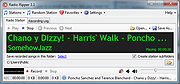 |
|
Radio Ripper 3.1 Radio Ripper 3.1 Radio Ripper is a small app that lets you listen to and record music from tens of thousands of free internet radio stations worldwide, that serve up everything from jazz, rock, classical and country to new age, Bollywood and disco. Recorded songs can be copied to other devices such as iPods, phones, tablets, etc. How do I use it? To find a radio station: Click Stations | Search or Stations | By Genre. Select a station from the list and download the station's playlist (.asx, .m3u, .pls, .ram or .xspf) file. Click Open | Playlist File to open the file you downloaded. To play a station, do any of the following: Click Open | Playlist File to open a playlist file (or just drag the file on to Radio Ripper). Click Random Station to play a random station. Click Stations | Favorites to play a favorite station. Click Stations | Recently Played to play a recently played station. If you like the station you're listening to, click Add To Favorites to add it to your list of favorites. To listen to a favorite station, click Stations | Favorites. To organize your favorite stations in folders click Favorites | Organize Favorites To share favorite stations with a friend: Click Export in the Organize Favorites window, and send your friend the .RRFavorites file that Radio Ripper created. ... |
 |
7,031 | Oct 19, 2015 Ravi Bhavnani |
|
Screamer Radio v1.7265 Screamer Radio v1.7265 Listen to internet radio Select, connect, and enjoy Select from thousands of radio stations Search by name, genre or country Star your favorites Set sleep timer, relax Absolutely free Features At a glance Listen to thousands of radio stations from many countries Quick search by name or part of URL Navigate by tags Star your favorite radio stations Connect to any radio station you want as long as you have a URL Sleep timer Automatic stop after playback has been muted for 10 minutes Automatic stop when desktop workspace is locked Supported streaming formats Shoutcast and Icecast MP3 Icecast OGG Vorbis WMA AAC and AAC+ Automatic stop This feature will help you avoid wasting bandwidth by stopping playback when you leave your computer or if you mute Screamer Radio and forget about it. Sleep timer Will stop playback after a countdown of 20, 40 or 60 minutes. System requirements Requires.NET Framework 4.5 which is available for Windows Vista SP2 and up. Stable 2019-11-22 New features: Add "Center window" menu option to system tray menu Automatically center the window if it starts up off screen Added always on top toggle to view menu Added output device selection to audio menu Added visualization frequency setting, can now also be turned off Prevent computer from sleeping while playing (can be changed in settings) Changes: Better grouping of settings in settings tab Moved settings to view menu ... |
|
6,165 | Dec 01, 2019 Steamcore 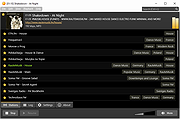 |
|
Universal Radio Hacker v2.9.1 Universal Radio Hacker v2.9.1 The Universal Radio Hacker (URH) is a complete suite for wireless protocol investigation with native support for many common Software Defined Radios. URH allows easy demodulation of signals combined with an automatic detection of modulation parameters making it a breeze to identify the bits and bytes that fly over the air. As data often gets encoded before transmission, URH offers customizable decodings to crack even sophisticated encodings like CC1101 data whitening. When it comes to protocol reverse-engineering, URH is helpful in two ways. You can either manually assign protocol fields and message types or let URH automatically infer protocol fields with a rule-based intelligence. Finally, URH entails a fuzzing component aimed at stateless protocols and a simulation environment for stateful attacks. Download user guide here. Instructional Video: This download is for the Windows 64bit version. If you need the Windows 32bit version, download here. If you need the MacOS version, download here. If you need the Linux version, download here. Changes: v2.9.1 Dec 30, 2020 0c8f383 use *.wav format for demodulated signal export 8af7da3 change separation colors to green and magenta a3eceba fix disappearing separation area in demod view 6a7048c fix #829 7d2e41b fix overflow in AutoInterpretation for certain signals Click here to visit the author's website. |
|
6,090 | Feb 11, 2021 Dr. Johannes Pohl 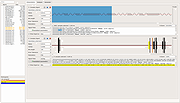 |
| Showing rows 1 to 7 of 7 | Showing Page 1 of 1 | 1 |
OlderGeeks.com Copyright (c) 2026
