|

|
Processed through Paypal No account required. |








Buy our over-priced crap to help pay the bills.



|
|
Processed through Paypal No account required. |
| Files | ||||
| File Name | Rating | Downloads | ||
 |
Classic and Extended Control Panel v1.0.0.8 Classic and Extended Control Panel v1.0.0.8 Keep using Control Panel forever! Microsoft is gradually phasing out the classic Control Panel in the Windows operating system, favoring the modern "Settings" application instead. The new interface makes it difficult for many users to find familiar system settings. The Classic and Extended Control Panel software aims to preserve the simplicity of the classic Control Panel while adding many new features. Features: • Full functionality of the classic Control Panel • Easy switching between "Classic" and "Extended" Control Panel • In "Extended" mode, the configuration options are significantly expanded (Administrative Tools, GodMode and installed software • All system configuration options are available in a single interface • Powerful search function and well-organized menu system for quick access to system settings • Autostart option • Free to use • No installation required Supported operating systems: Windows 10 and Windows 11 Classic and Extended Control Panel is the ideal solution for all those who like the traditional functionality of the Control Panel, while also having access to many additional system configuration options. Changes: v1.0.0.8 - Date: 2025-04-10 Add: Languages Click here to visit the author's website. |
 |
3,421 | Apr 10, 2025 WinTools.Info 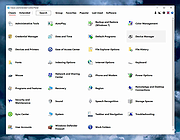 |
 |
Customizable Remote Administration Panel v2.0.6 Customizable Remote Administration Panel v2.0.6 Build a windows command line launcher that can be used to do remote work from your computer as well as having local buttons. Features Allows separators and linebreaks. Variable history. Add/Delete variable favorites. Allows some macros to be inserted where a path should go. (Usable in image path, command prefix and suffix.) (e.g. <appdir> for application directory and a few others.) Supports bmp, gif, jpg, png, exe, dll, and cpl files for button icons. (Right click the image file “…” button to see a pre built list of some.) Supports multiple layout files. (May have to select your button layout upon first load if you are still using 1.x versions.) Layout Link button type which will load another layout from a button in addition to the built in menu for switching layouts. Now includes a help file written by Tim Parsons as of 2.0.6 build 1. Requirements .NET 4.0 Click here to visit the author's website. |
|
4,214 | Jul 13, 2020 Carroll Dearstone 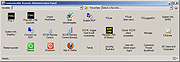 |
|
Ultimate Settings Panel v8.0.0 Ultimate Settings Panel v8.0.0 👉 Access 250+ Windows settings, tools, diagnostics and commands from one searchable panel. Ultimate Settings Panel brings hundreds of Windows settings, administrative tools, diagnostic commands and system utilities together in one convenient interface. The completely rebuilt application provides instant searching and direct access to Windows Settings pages, Control Panel items, networking tools, diagnostics, PowerShell, Windows Terminal, system administration utilities and more. The native Windows version requires no installation and launches tools and settings directly from its interface. A separate portable web edition is also available. Features: • More than 250 Windows settings, tools, diagnostics and commands • Instant search across tool names, descriptions and commands • 13 categories including Windows Settings, Windows Tools, Control Panel, Networking, Diagnostics, Power & Session, Server Administration, Terminal & Shell, Outlook/Office, Browsers and more • Direct access to approximately 70 Windows 11 Settings pages using ms-settings links • Launch Windows utilities and settings directly from the native application • Built-in access to SFC, DISM, battery reports, energy reports and other diagnostic tools • Wi-Fi reporting, Winsock reset and TCP/IP reset commands • Windows Terminal, PowerShell 7 and winget tools • Save frequently used items as Favorites • Light and dark themes with automatic system theme detection • Copy commands for use elsewhere • Export commands as batch files from the web edition • Native application requires no installation • Portable web edition works offline • No analytics, tracking or telemetry Supported operating systems: • Windows 10, Windows 11 Supported languages: English Changes: v8.0.0 08-07-26 Complete ground-up rebuild replacing the original C#/WinForms application. Added a native Windows application using Microsoft Edge WebView2. Added a self-contained portable web edition that can operate offline. Added instant searching of names, descriptions and underlying commands. Added a Windows 11 Settings category with approximately 70 direct Settings links. Added a Terminal & Shell category covering Windows Terminal, PowerShell 7 and winget. Added modern system diagnostics including SFC, DISM, battery and energy reports, Wi-Fi reporting, Winsock reset ... |
|
5,097 | Aug 19, 2026 TechyGeeksHome 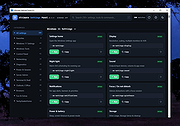 |
| Showing rows 1 to 3 of 3 | Showing Page 1 of 1 | 1 |
OlderGeeks.com Copyright (c) 2026
