|

|
Processed through Paypal No account required. |








Buy our over-priced crap to help pay the bills.



|
|
Processed through Paypal No account required. |
| Files | ||||
| File Name | Rating | Downloads | ||
 |
Alchemy v008 Alchemy v008 Experimental open source drawing and sketching software for exploring creative ideas. Alchemy is an open source drawing application designed to help artists, designers, and creative thinkers generate ideas during the earliest stages of the creative process. Rather than focusing on producing polished artwork, Alchemy encourages experimentation through a collection of unique drawing modules that introduce randomness, symmetry, procedural shapes, voice interaction, and other unconventional techniques. The intentionally minimalist interface removes distractions such as undo and object editing, allowing users to rapidly explore concepts and discover unexpected forms. Built in Java, Alchemy is cross-platform and extensible through a modular plugin system, making it easy for developers and artists to create and share their own drawing modules. Features: • Experimental sketching environment focused on concept generation • Minimal interface designed to reduce distractions • Modular architecture with removable and expandable drawing modules • Random and procedural shape generation • Real-time mirror drawing for symmetrical artwork • Blind drawing mode for creative experimentation • Voice-controlled drawing modules • Session recording with automatic PDF snapshots • Automatic canvas clearing at configurable intervals • Export artwork as SVG, PDF, PNG, and JPEG • Adjustable export image scaling • Horizontal and vertical canvas flipping • Smooth, Ribbon Shapes, Limit, and Splatter Shapes modules • Configurable background transparency • Open source and extensible through custom Java modules Supported operating systems: • Windows • macOS • Linux • Requires Java Runtime Environment 1.5 or higher required Supported languages: • English, Persian Changes: v008 • Added SVG export and switching support using the Batik library • Added export image scaling for JPEG and PNG • Added horizontal and vertical canvas flipping • Added Smooth, Ribbon Shapes, Limit, and Splatter Shapes modules • Added configurable background transparency • Added Persian localization • Added outline-only rendering option for Shapes module while drawing • Alchemy now remembers the export directory between sessions • Fixed Mirror and Color Switcher coloring issues • Improved Color Palette positioning • Updated the JPen tablet library • Fixed fullscreen transparent mode rendering • Fixed ... |
 |
4,319 | Jun 25, 2026 Karl D.D. Willis/Jacob Hina 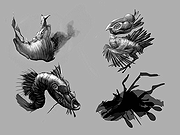 |
 |
ItsPaint v0.16.1 ItsPaint v0.16.1 👉 A lightweight, free and open source MS Paint-style image editor for Mac. ItsPaint is a native image editor designed to provide the simple, quick drawing and editing experience of Microsoft Paint on macOS. It can create a blank canvas at any size, draw and paint with multiple tools, paste images directly onto the canvas, crop and resize artwork, annotate screenshots, remove backgrounds, add text and shapes, and export to numerous common image formats. It is intentionally lightweight, requires no account or subscription, contains no telemetry or networking code, and is released under the MIT license. Features: • Create blank canvases at custom sizes • Pencil, brush, highlighter and eraser drawing tools • Round, square, soft and spray brush tips • Draw lines, curves, arrows, rectangles, rounded rectangles, ellipses, triangles, diamonds, polygons, stars and speech bubbles • Solid, dashed and dotted shape outlines with optional fills • Add text with a contrasting rim that remains readable against light and dark backgrounds • Automatic numbered step badges for annotating instructions and screenshots • Pixelate areas for visual de-emphasis • Spotlight tool darkens everything outside a selected area • Clone tool copies pixels from one part of an image to another • Soften tool blends cloned or repaired areas into their surroundings • Instant Alpha selects connected pixels by color • One-command background removal without AI, cloud processing or an Internet connection • Capture a signature with a trackpad, mouse or tablet, or import one from an image • Rectangle, ellipse, lasso and Instant Alpha selection modes • Move selected pixels directly on the canvas • Paste images as floating objects that can be moved and scaled before committing • Automatically expands the canvas when pasted content is larger than the current image • Drag the current selection or entire canvas directly into another application or Finder • Pointer-centered zoom and pixel grid • Snap shapes, selections and pasted content to an 8, ... |
|
223 | Aug 13, 2026 Josh Lin 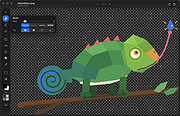 |
|
Tux Paint v0.9.29 Tux Paint v0.9.29 A free, award-winning drawing program for children ages 3 to 12. It combines an easy-to-use interface, fun sound effects, and an encouraging cartoon mascot who guides children as they use the program. Kids are presented with a blank canvas and a variety of drawing tools to help them be creative. Along with paintbrush, shapes and text, Tux Paint includes a "stamp" feature to add pre-drawn or photographic imagery to pictures, and a set of "magic tools" that provide filter effects (like blur, tint and waves) and interesting drawing tools (like train tracks, bubbles and grass). Tux Paint includes a collection of "starter" images, both coloring-book style and photo-realistic, and a large collections of stamps are available as a separate download. Additional content can be added by parents and teachers, or downloaded from 3rd parties. This download is for the Windows 64bit installer version. All other download assets are below: Windows: tuxpaint-0.9.29-windows-i686-installer.exe (32bit) tuxpaint-stamps-2023-04-02-windows-installer.exe (Rubber Stamps-optional) MacOS: TuxPaint-0.9.29.dmg TuxPaint-Stamps-2023.04.02.dmg (Rubber Stamps-optional) TuxPaint-Config-0.0.20.dmg (Contains the Tux Paint Config application for MacOS. Copy it from the DMG onto your hard disk. For example, create a "Tux Paint" folder in your "Applications" folder, and copy it there.) Click here to visit the author's website. |
|
6,678 | May 02, 2023 TOYAMA Shin-Ichi 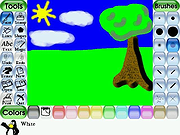 |
| Showing rows 1 to 3 of 3 | Showing Page 1 of 1 | 1 |
OlderGeeks.com Copyright (c) 2026
