|

|
Processed through Paypal No account required. |








Buy our over-priced crap to help pay the bills.



|
|
Processed through Paypal No account required. |
| Files | ||||
| File Name | Rating | Downloads | ||
 |
ImageConverter v1.6.0 ImageConverter v1.6.0 👉 Change image formats in one click. ImageConverter lets you quickly convert image files by dragging them into the list and clicking Convert. It supports multiple popular formats, resizing by width, high-compression JPG saving with MozJPEG, and can recognize images by file signature even when they do not have an extension. Features: • Change various image formats • Save JPG with higher compression using MozJPEG • Resize images by specifying the width • Supports PDF, SVG, AI, PSD, PNG, JPG, GIF, WEBP, and TGA • Recognizes images with file signature information even without an extension • Simple drag-and-convert workflow Supported operating systems: • Windows 10, Windows 11 Supported languages: English, German, Esperanto, French, Italian, Japanese, Polish, Portuguese, Russian, Slovak, Swedish, Thai, Turkish, Vietnamese, Chinese Changes: v1.6.0 05-20-26 • Fixed inconsistent default value when setting image width • Improved PDF conversion stability to prevent occasional freezes and leftover files Usage: • Drag the image files you want to change into the list. • Click the Convert button below. Click here to visit the author's website. |
 |
1,049 | May 28, 2026 kilho.net 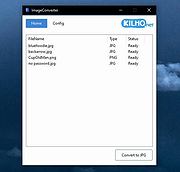 |
 |
PhotoSuite v0.9.7 PhotoSuite v0.9.7 👉 A desktop image editor for layered photo editing, digital artwork, and native PSD files. PhotoSuite is a desktop image editor built around a familiar Photoshop-style workspace. It uses PSD as its native document format, preserving layers, masks, blending modes, text, vector paths, and other document data when opening and saving files. It also supports PSB for large documents. The editor brings photo retouching, painting, vector drawing, typography, filters, and document layout into one workspace. You can work with layers and masks, make selections, paint or repair parts of an image, add text and shapes, and revisit earlier work through the History palette. Smart Objects and Smart Filters provide options for editing without permanently changing the original layer. PhotoSuite runs locally as a desktop application. According to the developer, it requires no cloud account and collects no telemetry. Features: • Open, edit, and save layered PSD documents as a native format • Work with PSB files for large documents • Create raster layers, vector layers, layer groups, clipping masks, and layer masks • Use blending modes and layer styles such as Drop Shadow, Inner Shadow, glows, overlays, Bevel & Emboss, and Stroke • Edit with Smart Objects and Smart Filter stacks • Save different document arrangements with layer comps • Make selections with Marquee, Lasso, and Magic Wand tools • Paint and retouch with Brush, Clone Stamp, Healing Brush, Eraser, Blur, Sharpen, Dodge, and Burn tools • Crop images and apply gradients • Draw paths and shapes with the Pen and shape tools • Add text with support for text along a path, text warp, ligatures, and kerning • Pan, zoom, and rotate the canvas; use rulers, guides, and a pixel grid • Revisit edits with the History palette and snapshots • Apply filters, use Liquify, and make lens corrections • Open and export formats including PNG, APNG, JPEG, WebP, AVIF, TIFF, GIF, BMP, TGA, SVG, and ... |
|
26 | Sep 24, 2026 eolix 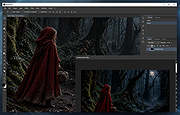 |
| Showing rows 1 to 2 of 2 | Showing Page 1 of 1 | 1 |
OlderGeeks.com Copyright (c) 2026
