|

|
Processed through Paypal No account required. |








Buy our over-priced crap to help pay the bills.



|
|
Processed through Paypal No account required. |
| Files | ||||
| File Name | Rating | Downloads | ||
 |
OpenLogi v0.6.3 OpenLogi v0.6.3 👉 A local-first Logitech mouse configurator for macOS with no account, cloud or telemetry. OpenLogi is a native, open-source alternative to Logitech Options+ that lets you remap Logitech mouse buttons, control DPI, adjust SmartShift wheel behavior and use per-app profiles directly over HID++. It works locally on your Mac, stores settings in a plain TOML config file, and does not require a Logitech account, cloud service or telemetry. Features: • Remap Logitech mouse buttons from a native macOS interface • Built-in action catalog plus custom keyboard shortcut recording • DPI control with presets and cycle/set-preset actions • SmartShift wheel control for ratchet, free-spin and automatic switching • Per-application profiles that switch when the focused app changes • Supports Logi Bolt, Bluetooth-direct and wired USB connections • Live paired-device carousel with battery percentage and charge state • Plain-text TOML configuration • No Logitech account required • No telemetry, analytics or cloud sync • Open source and dual licensed under MIT / Apache-2.0 • Signed and notarized macOS DMG available Supported operating systems: • macOS Supported languages: English, Danish, German, Greek, Spanish, Finnish, French, Italian, Japanese, Korean, Norwegian Bokmεl, Dutch, Polish, Portuguese (Brazil), Portuguese (Portugal), Russian, Swedish, Simplified Chinese, Traditional Chinese (Hong Kong), Traditional Chinese (Taiwan) Changes: v0.6.3 06-09-26 • Added unified Binding model and gesture-button menu. • Added gesture buttons on Middle, Back and Forward via the OS hook. • Release v0.6.3. This download is for the macOS ARM64 version (very bottom of page). If you need the macOS Intel version, download here. Click here to visit the author's website. |
 |
468 | Jun 10, 2026 AprilNEA 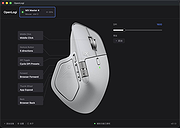 |
| Showing rows 1 to 1 of 1 | Showing Page 1 of 1 | 1 |
OlderGeeks.com Copyright (c) 2026
