|

|
Processed through Paypal No account required. |








Buy our over-priced crap to help pay the bills.



|
|
Processed through Paypal No account required. |
| Files | ||||
| File Name | Rating | Downloads | ||
 |
Butterfly On Desktop v1.0 Butterfly On Desktop v1.0 Enjoy being annoyed? Try having butterflies infest your computer! You can manage all butterfly settings from system tray butterfly icon where you can enable it for startup, add more butterflies on desktop and exit option also. Contains no malware, viruses, toolbars or any other bundleware. |
 |
5,041 | Mar 04, 2020 Free Desktop Soft  |
|
Cockroach on Desktop v1.2 Cockroach on Desktop v1.2 Is it really even a proper day at the office if you don't mess with a coworker? When you see one of these cockroaches on the screen, they look very real. They even walk around the same way real cockroaches do. You can make beautiful laughter, if you like these types of jokes. You can manage all cockroach settings from system tray cockroach icon where you can enable it for startup, add more cockroach on desktop and exit option also. Application use less system resources so you can use it without think about system speed worry. Contains no malware, viruses, toolbars or any other bundleware. |
|
4,486 | Mar 04, 2020 Free Desktop Soft  |
|
Enable/Disable Remote Desktop on Remote System Enable/Disable Remote Desktop on Remote System For those times when you need to remote into a system and remote desktop is disabled, the below script can come in very handy. |
|
6,374 | Nov 15, 2019 Musings of an IT Pro 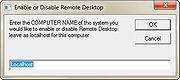 |
|
Fly on Desktop v1.5 Fly on Desktop v1.5 Amazingly real. Perfect for a restaurant's POS system! The most realistic fly for your desktop! Fully simulates the behaviour of a real fly. Launch of 5-10 units, and you will believe that these are true flies. To remove a fly from the screen, just double click on it. Contains no malware, viruses, toolbars or any other bundleware. |
|
4,390 | Mar 04, 2020 Free Desktop Soft  |
|
Frets on Fire 1.3.110 Frets on Fire 1.3.110 Frets on Fire is a game of musical skill and fast fingers. The aim of the game is to play guitar with the keyboard as accurately as possible. Features Playing pose Unique inverted keyboard gameplay style Support for guitar controllers and generic joysticks Includes a song editor for making your own tunes Compete with others on the World Charts Hundreds of songs composed by the community Supports importing Guitar Hero™ I and Guitar Hero™ II songs Multiplatform; runs on Windows™, Linux®, Mac OS X™ and FreeBSD® Open source, full Python source code available Requirements 128 MB of RAM A fairly fast OpenGL graphics card with decent drivers Windows:Direct X compatible sound card Linux:SDL compatible sound card; SDL library installed Mac OS X: Intel processor Credits Frets on Fire was created as an entry to the Assembly 2006 Game Development Competition by Unreal Voodoo. It placed first in the competition. The original team members are: Game Design, Programming Sami Kyöstilä Music, Sound Effects Tommi Inkilä Graphics Joonas Kerttula Jürgen Mikko Korkiakoski |
|
6,574 | Jun 24, 2016 Unreal Voodoo  |
 |
NETworkManager v2026.2.22.0 NETworkManager v2026.2.22.0 👉 Powerful open-source network management and troubleshooting tool. NETworkManager is a comprehensive open-source application designed to help administrators and power users manage, analyze, and troubleshoot network environments. It provides a wide range of built-in tools within a single, modern interface, making it easier to monitor connections, configure network settings, and diagnose connectivity issues without switching between multiple utilities. NETworkManager supports remote connections and offers advanced features for managing IP addresses, DNS, WiFi networks, ports, and more. With its modular design and extensive toolset, it is well-suited for both everyday network diagnostics and more advanced administrative tasks. Supported languages: • English, German, Spanish, French, Italian, Russian, Chinese (Simplified), Chinese (Traditional), Japanese, Korean, Portuguese, Polish Changes: v2026.2.22.0 02-22-26 Breaking Changes Migrated from .NET 8.0 (LTS) to .NET 10.0 (LTS). Upgrade your .NET Desktop Runtime to version 10.0 (LTS) - x64 before you install this version. AWS Session Manager feature has been removed. Profile and settings files have been migrated from XML to JSON. Existing files will be automatically converted to JSON on first load after the update. You should back up your settings and profile file before installing. New Features System-Wide Policies for enterprise deployment and management. Administrators can now configure system-wide policies via a config.json file in the application directory to control specific settings for all users. DNS Lookup now allows direct input for dns server ip|host:port (port - is optional) Remote Desktop connect admin (console) session Migrated Dialogs to ChildWindows This download is for the Windows portable version (very bottom of page). If you need the Windows installer version, download here. Click here to visit the author's website. |
|
4,094 | Jul 05, 2026 BornToBeRoot 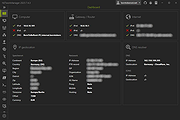 |
|
On Screen RGB Detector v1.2 On Screen RGB Detector v1.2 Detects and displays the RGB (red, blue, green) value of any spot on your screen. On-Screen RGB (Red, Green, Blue) Detector is an innovative approach that enables on-screen colour detection with few hand gestures. Sometimes you need to know the RGB value of a picture or anything else, then you are in the right place. The On Screen RGB Detector measures the RGB color value of every single pixel on your computer screen live by following the cursor/mouse pointer position along with the pixel coordinates. Application is built using Python programing language (3.10) and Tkinter framework for Graphical User Interface (GUI). System Requirements Windows 10 or newer) Features Measurement of RGB colours by following the position of cursor/mouse pointer with pixel coordinate live Readings are captured by keystrokes for user convenience RGB values are automatically copied to clipboard Click here to visit the author's website. |
|
2,894 | Sep 21, 2023 Abhijeet Kumar 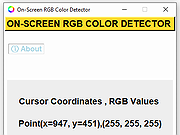 |
|
Proxy On OFF Switcher 1.0 Proxy On OFF Switcher 1.0 A useful script for Laptop users who work in and out of the office and are behind a proxy server when in the office and are not when out of the office. For those users who have difficulty changing the settings manually through internet explorer this script can save them and your helpdesk invaluable amounts of time and headaches. This script detects the current proxy state and depending on that sate prompts you to enable or disable it. It also kills any current internet explorer instances and when it completes starts a new internet explorer instance. The only variable thats needs to be changed is on line 50 Replace <Domain Proxy Server> with the IP or name of your domain proxy server without the brackets <> eg. ContosoProxy:80 |
|
5,910 | May 02, 2017 Musings of an IT Pro 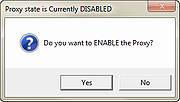 |
|
Restart on Crash v1.6.4 Restart on Crash v1.6.4 A monitoring tool that will watch the applications that you specify and automatically relaunch any program that hangs or crashes. You can add any number of applications to monitor, enable/disable them individually and edit the command line that will be used to restart an application. Restart on Crash doesn’t require installation and stores all it’s configuration data in a “settings.ini” file in the program’s folder, so it’s portable. It should be compatible with most NT-based Windows versions. How to... To add a new application to monitor, click the “Add” button or press the Ins key. To delete on or more applications from the list, select them and click “Delete” or press Del. To edit the per-application configuration, double-click the correspoding row. This will open the editing dialog (see below). You can also access the RoC configuration by clicking “Settings” and view the activity log by clicking “Show Log”. The log contains information about crashed/hanged applications, executed commands, and so on. Well, this one should be pretty self-explanatory 🙂 One detail to keep in mind is that enabling the “It isn’t running” option will make Restart On Crash treat the application as if it has crashed even if you have purposefully it closed it. You can get around this by disabling the monitoring of the application before you close it. “Grace period” is how long Restart on Crash will wait before trying to terminate/restart an application that it has just terminated/restarted. This is intended to prevent a scenario where RoC kills a hanged program, restarts it, decides it has hanged again (e.g. if the program is non-responsive while starting up) and wrongfully terminates it again. Known Issues If you configure RoC to automatically kill a hanged application, ... |
|
6,093 | Nov 23, 2022 W-Shadow.com 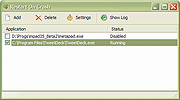 |
 |
Sugar on a Stick v0.118 Sugar on a Stick v0.118 A Fedora® Spin operating system to create a live (bootable) flash drive featuring the award-winning Sugar Learning Platform for kids. What is Sugar? Sugar is a learning platform that reinvents how computers are used for education. Collaboration, reflection, and discovery are integrated directly into the user interface. Sugar promotes "studio thinking" and "reflective practice". Through Sugar's clarity of design, children and teachers have the opportunity to use computers on their own terms. Students can reshape, reinvent, and reapply both software and content into powerful learning activities. Sugar's focus on sharing, criticism, and exploration is grounded in the culture of free software (FLOSS). About the Sugar pedagogy Information is about nouns; learning is about verbs. The Sugar interface, in its departure from the desktop metaphor for computing, is the first serious attempt to create a user interface that is based on both cognitive and social constructivism: learners should engage in authentic exploration and collaboration. It is based on three very simple principles about what makes us human: 1) everyone is a teacher and a learner; 2) humans by their nature are social beings; and 3) humans by their nature are expressive. These are the pillars of a user experience for learning. Sugar also considers two aphorisms: 1) you learn through doing, so if you want more learning you want more doing; and 2) love is a better master than duty—you want people to engage in things that are authentic to them, things that they love. About the Sugar Learning Platform The Sugar Learning Platform is an alternative to the ubiquitous computer desktop metaphor that has dominated computing since its invention at Xerox PARC (Palo Alto Research Center) in the 1970s. (Children are not office workers, nor does ... |
 |
2,859 | Nov 10, 2023 Sugar Labs 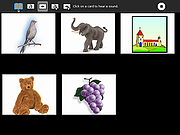 |
| Showing rows 1 to 10 of 10 | Showing Page 1 of 1 | 1 |
OlderGeeks.com Copyright (c) 2026
