|

|
Processed through Paypal No account required. |








Buy our over-priced crap to help pay the bills.



|
|
Processed through Paypal No account required. |
| Files | ||||
| File Name | Rating | Downloads | ||
 |
Nearby Glasses v1.0.8 Nearby Glasses v1.0.8 👉 Detects nearby smart glasses using Bluetooth Low Energy signals. Nearby Glasses is a free, open-source utility designed to detect nearby smart glasses by passively scanning Bluetooth Low Energy (BLE) advertising data. The app identifies supported smart glasses using Bluetooth manufacturer identifiers and can notify you when a compatible device is detected within range. Detection is based solely on publicly broadcast BLE advertising frames and does not establish a connection with other devices or transmit any of your data. The developer notes that false positives and missed detections are possible, as some non-glasses devices may use the same manufacturer identifiers. The project is licensed under the GNU AGPL v3.0 and is available for both Android and iOS.      Features: • Passively scans Bluetooth Low Energy (BLE) advertisements • Detects supported smart glasses using manufacturer identifiers • Adjustable RSSI threshold to control detection sensitivity • Configurable notification cooldown • Canary Mode for iOS operation • Optional scan log display • Processes all scan data locally on the device • Does not establish Bluetooth connections or pair with devices • No advertisements or user tracking • Free and open source under the AGPL v3.0 license Supported operating systems: • Android 8.0 (Oreo) or higher • iOS 17.0 or higher Supported languages: English, French, German, Swiss German, Italian, Portuguese (Brazil), Spanish Changes: v1.0.8 07-16-26 added fixes to Russian translation (partly) added support for HeyCyan (Nilox Smart AI Glasses, sold by ALDI/Hofer) added support for RollMe and Rogbird fixed some minor bugs      This download is for the Android APK file (very bottom of page). All other download assets are below: F-Droid APK: yj_nearbyglasses_1.0.8-izziFdroid.apk Or: Click here to visit the author's website. |
 |
304 | Jul 17, 2026 Yves Jeanrenaud 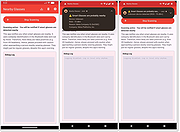 |
 |
Password Expiry Email Notification v2.9 Password Expiry Email Notification v2.9 This script will email an Active Directory user in the event that their password is due to expire in X number of days. EXAMPLE PasswordChangeNotification.ps1 -smtpServer mail.domain.com -expireInDays 21 -from "IT Support <support@domain.com>" -Logging -LogPath "c:\logFiles" -testing -testRecipient support@domain.com This example will use mail.domain.com as an smtp server, notify users whose password expires in less than 21 days, send mail from support@domain.com Logging is enabled, log path is c:\logfiles Testing is enabled, and test recipient is support@domain.com EXAMPLE PasswordChangeNotification.ps1 -smtpServer mail.domain.com -expireInDays 21 -from "IT Support <support@domain.com>" -reportTo myaddress@domain.com -interval 1,2,5,10,15 This example will use mail.domain.com as an smtp server, notify users whose password expires in less than 21 days, send mail from support@domain.com Report is enabled, reports sent to myaddress@domain.com Interval is used, and emails will be sent to people whose password expires in less than 21 days if the script is run, with 15, 10, 5, 2 or 1 days remaining untill password expires. Youtube Channel for hints and tips on how to configure the script. https://www.youtube.com/user/robtitlerequired Right-click on download below and choose to save link. Otherwise it will open the script instead of downloading. Click here to visit the author's website. |
|
3,851 | Dec 28, 2020 Robert Pearman 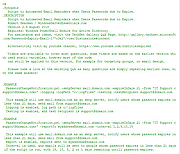 |
|
Pelton v2026.3.2 Pelton v2026.3.2 👉 A privacy-focused open-source email client that keeps your mail under your control. Pelton is a free, open-source desktop email client designed around privacy, speed, and simplicity. Instead of routing your email through third-party services, Pelton connects directly to your existing IMAP and SMTP accounts while storing your data locally in an SQLite database. There is no telemetry, no tracking, and no cloud service standing between you and your email. Built with a modern interface and a keyboard-friendly workflow, Pelton offers fast local searching, offline access, scheduled sending, message snoozing, built-in document previews, customizable themes, and portable configuration backups. Everything runs locally, making it equally suitable for everyday email users and privacy-conscious professionals who want complete control over their communications. Features: • Fast local search using a local SQLite database for instant results, even with large mailboxes. • Cross-platform support for Windows, macOS, and Linux. • Zero telemetry with no tracking or crash reporting. • Connects directly to standard IMAP and SMTP mail providers. • Stores email locally while remaining synchronized with your existing mail provider. • Download messages for offline reading by pinning messages or selecting a date range. • Immediate synchronization using IMAP IDLE for prompt delivery of new mail. • Native desktop notifications for Windows, macOS, and Linux. • Built-in previewer for PDFs, images, and text files. • Snooze messages to return unread at a scheduled time. • Schedule outgoing messages with Send Later. • Export accounts, preferences, and layouts into a portable configuration file. • Eight colored message flags stored locally or synchronized using IMAP keywords. • Extensive customization including themes, layouts, display density, and custom CSS. • Import themes safely with selective importing and automatic removal of remote references. Supported operating systems: • Windows 10, Windows 11 • macOS 13 Ventura or higher (Intel and Apple Silicon) • Linux x86-64 (Debian/Ubuntu, Fedora, and other modern distributions) Supported languages: English, German, French, Dutch, Spanish, Polish Changes: v2026.3.2 08-01-26 • Added ... |
|
256 | Aug 05, 2026 Arne K. 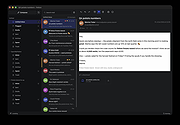 |
| Showing rows 1 to 3 of 3 | Showing Page 1 of 1 | 1 |
OlderGeeks.com Copyright (c) 2026
