|

|
Processed through Paypal No account required. |








Buy our over-priced crap to help pay the bills.



|
|
Processed through Paypal No account required. |
| Files | ||||
| File Name | Rating | Downloads | ||
 |
FolderTimeUpdate v1.75 FolderTimeUpdate v1.75 👉 Updates folder modified times based on the newest files inside them. FolderTimeUpdate is a simple Windows tool that scans all files and folders under a base folder you choose, then updates each folder's Modified Time according to the latest modified time of the files stored inside it. This can be useful after restoring backed-up folders when the backup program did not preserve the original folder modified times. Features: • Scans files and folders under a selected base folder • Updates folder Modified Time according to files inside the folder • Simulation Mode previews changes without applying them • Supports updating folder date/time from the command line • Can save update logs as text, tab-delimited, CSV, HTML, or XML • Supports choosing how folder modified time is calculated • Supports excluding folders from scanning or updating • Supports wildcard filtering for scanned files • Supports skipping hidden and system files • Supports Explorer context menu integration • Includes 32-bit and 64-bit downloads • No installation required Supported operating systems: • Windows 2000, Windows XP, Windows Vista, Windows 7, Windows 8, Windows 10, Windows 11 • 32-bit and 64-bit systems Supported languages: Arabic, Brazilian Portuguese, Bulgarian, Dutch, English, French, German, Greek, Hungarian, Italian, Japanese, Persian, Polish, Romanian, Russian, Simplified Chinese, Slovak, Spanish, Traditional Chinese, Turkish Changes: v1.75 Added option to change the sorting column from the menu (View -> Sort By). Like the column header click sorting, if you click again the same sorting menu item, it'll switch between ascending and descending order. Added 'Sort By' button to the toolbar. This download is for the Windows 64bit version (very bottom of page). If you need the Windows 32bit version, download here. Click here to visit the author's website. |
 |
6,431 | Apr 30, 2026 Nir Sofer 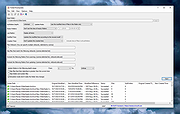 |
|
Recently Created or Modified Executables Search v2.1.0.2 Recently Created or Modified Executables Search v2.1.0.2 Free tool for incident response. Inspect executable modules created or modified on your computer during a recent time window (cybersecurity incident time) you select. Returns each module's metadata along with the file's SHA-256 value. Helps discover file artifacts from malware incidents. More info: This application may be used at no cost after reading and accepting the built-in EULA. Write access to the Application's working directory is required for the product license file. Uniquely identify executable modules, file artifacts, deposited by System processes and unsafe user activity during a Cybersecurity incident time. Helps associate modules with unsafe or risky applications. Intended target audience: Cybersecurity, Network, Systems Analysts, and similar technical users. SHA-256: 239fbc57cafdadeec735bf12aa1453b5c8858af16286c8606c8a7d2c7340bc22 Supported operating systems: Windows 10/11 64bit Important Notes: 1) This program will not function unless you install Microsoft .NET 6.0. Get it HERE. 2) This program will not function unless you right-click the file and choose to run as an administrator. 3) Once launched, allow the program to finish it's scan operation. This may take a few minutes. |
|
3,753 | May 07, 2024 Steve Chaison Software 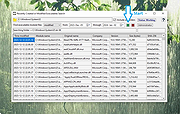 |
| Showing rows 1 to 2 of 2 | Showing Page 1 of 1 | 1 |
OlderGeeks.com Copyright (c) 2026
