|

|
Processed through Paypal No account required. |








Buy our over-priced crap to help pay the bills.



|
|
Processed through Paypal No account required. |
| Files | ||||
| File Name | Rating | Downloads | ||
 |
LogSight v1.0.0 LogSight v1.0.0 A desktop log file viewer. Features: • Multiple highlights. • Multiple filters. • Multiple log formats. A log format contains the parser definition to split the log file in columns as well as the various highlights and filters defined for it. LogSight remembers which log format was used for which file. • Auto-scroll mode, similar to tail -f. • Can work on local files and stdin. Supported operating systems: Windows 7 or later and Linux. User Guide: Defining the parser: The parser definition is a regular expression with named groups. For example, given the following log lines: 12:34:56 myapp:1234 debug Start app 15:16:54 myapp:1234 warning Something went wrong To create a parser which splits this into time, app, pid, level and message columns, you could use the following definition: (?<time>\d+:\d+:\d+) (?<app>\w+):(?<pid>\d+) (?<level>\w+) (?<message>.*) The log file view updates in real time as you type. Defining highlights & filters: A highlight is made of two elements: the highlight condition and the highlight colors. A filter only contains conditions. The highlight condition uses a simple DSL inspired from the Wireshark DSL. Its syntax is: <column> <operator> <criteria> • column is the name of a column defined in the log parser • operator is one of: ▸ = or ==: exact match ▸ contains: the cell must contain the criteria string ▸ ~: the cell must match the criteria regular expression • criteria is the string to match. ... |
 |
734 | Nov 21, 2025 Mechanika Design 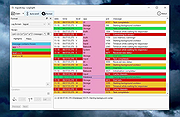 |
| Showing rows 1 to 1 of 1 | Showing Page 1 of 1 | 1 |
OlderGeeks.com Copyright (c) 2026
