|

|
Processed through Paypal No account required. |








Buy our over-priced crap to help pay the bills.



|
|
Processed through Paypal No account required. |
| Files | ||||
| File Name | Rating | Downloads | ||
 |
Process Governor v1.3.1 Process Governor v1.3.1 👉 Automate Windows process and service priority, I/O priority, and CPU affinity rules. Process Governor is a free Python-based Windows utility that automates the management of processes and services by applying user-defined rules for priority, I/O priority, and CPU core affinity. It can be used to fine-tune system responsiveness, control how selected programs use CPU cores, and automatically apply preferred settings to matching processes or services. Features: • Adjust process and service priorities • Control I/O priorities for better resource management • Set CPU core affinity for selected processes • Create rules for processes by name, path, or command line • Create rules for Windows services by service name • Supports wildcards in process and service rules • Optional force mode for continuous rule application • Optional delay before applying rules • View running process details including PID, executable path, service name, and command line • Search, sort, and filter process and service lists • System tray menu with access to settings, config file, log file, updates, startup option, and quit • Open file locations, file properties, and service properties from the process list • Undo, redo, hotkeys, and inline rule editing • Error highlighting for invalid rule entries • Optional auto-start with Windows Supported operating systems: • Windows 10 • Windows 11 Supported languages: English Changes: v1.3.1 04-19-25 Bug Fixes Fixed error messages: Resolved occasional error messages in the garbage collection process. Click here to visit the author's website. |
 |
1,030 | Jun 15, 2026 System X - Files 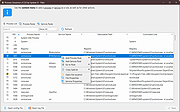 |
| Showing rows 1 to 1 of 1 | Showing Page 1 of 1 | 1 |
OlderGeeks.com Copyright (c) 2026
