|

|
Processed through Paypal No account required. |








Buy our over-priced crap to help pay the bills.



|
|
Processed through Paypal No account required. |
| Files | ||||
| File Name | Rating | Downloads | ||
 |
AlternateStreamView v1.58 AlternateStreamView v1.58 👉 View, copy, export and delete hidden NTFS alternate data streams. AlternateStreamView is a small utility that scans NTFS drives or folders and finds hidden alternate streams stored in the file system. After scanning, you can extract streams to a selected folder, delete unwanted streams, or save the stream list as text, HTML, CSV or XML. Features: • Scan NTFS drives or folders for hidden alternate data streams • View stream name, file name, stream size and related file details • Export selected streams to a folder • Delete unwanted alternate streams • Save results as TXT, HTML, CSV, XML and other report formats • Scan subfolders with optional folder-depth control • Supports file wildcard filtering • Explorer context menu option for checking a single file • Command-line options for scanning and exporting results • Portable utility with no installation required Supported operating systems: • Windows 2000 through Windows 11 • 32-bit and 64-bit systems Supported languages: Arabic, Brazilian Portuguese, Czech, Dutch, Finnish, French, German, Greek, Hungarian, Italian, Japanese, Persian, Polish, Romanian, Russian, Simplified Chinese, Slovak, Spanish, Traditional Chinese, Turkish, Ukrainian, Valencian Changes: v1.58 Updated to stop the file system scan when you press the Esc key. This download is for the Windows 64bit version (very bottom of page). If you need the Windows 32bit version, download here. Click here to visit the author's website. |
 |
10,318 | Jun 04, 2026 Nir Sofer 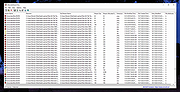 |
|
DeepTaskScan v1.0.0 DeepTaskScan v1.0.0 👉 Portable Windows forensics tool for detecting hidden and persistent scheduled tasks. DeepTaskScan is an advanced Windows scheduled task viewer and forensics tool designed to uncover scheduled tasks that may be hidden from standard Windows utilities. Unlike Task Scheduler, schtasks, PowerShell and similar tools, it uses a different scanning method rather than relying on Windows API calls to discover scheduled tasks. This can help system administrators, technicians and security researchers identify tasks concealed through techniques involving deleted task files or registry keys. The developer notes that such techniques have been used by state-backed Advanced Persistent Threat (APT) groups. DeepTaskScan is completely portable, requires no installation and is available in both 32-bit and 64-bit versions. Features: • Deeply scans Windows for scheduled tasks using an alternative detection method • Detects scheduled tasks hidden through advanced techniques • Does not rely on Windows API calls for scheduled task detection • Helps uncover tasks that may not appear in Windows Task Scheduler • Can detect more scheduled task entries than Task Scheduler, PowerShell and other standard tools • Highlights hidden or persistent entries • Can help detect APT activity involving hidden Task Scheduler entries • Allows discovered information to be extracted to a file • Useful for system administration, troubleshooting and security forensics • Available as separate 32-bit and 64-bit executables • Completely portable with no installation required Supported operating systems: • Windows 7 or newer Supported languages: • English Changes: v1.0.0 08-16-26 Initial release. This download is for the Windows 64bit version (very bottom of page). If you need the Windows 32bit version, download here. Click here to visit the author's website. |
|
352 | Aug 20, 2026 Emir Alp Kocak  |
 |
Hidden Utilities XP v1.0 Hidden Utilities XP v1.0 Hidden Utilities XP allows access to nearly 100 hidden utilities that are not normally accessible to the average user in Windows XP. System information, diagnostics, repair tools and more in both Windows and Command Line utilities are now easily opened. Hidden Utilities XP includes easy access to 53 Windows tools and 43 Command Line utilities. Click here to visit the author's website. |
|
5,322 | Jul 01, 2019 Camtech 2000 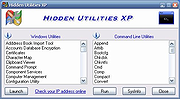 |
|
Hidden Windows 10 Features v1.3.1 Hidden Windows 10 Features v1.3.1 Free program to turn on hidden features in Windows 10 (mostly works in Windows 11 as well). Windows 10, just like the previous Windows versions, have many useful hidden features. These features can be enabled by editing the Windows registry. Manual editing of Windows registry is long and not so easy process. With Hidden Windows 10 Features are hidden features available with one click. This tool allows to export settings and imports them to another computer. It can also be used as a backup when settings are changed. Hidden Windows 10 Features allows to add items such as Recycle Bin, All Control Panel Items, Administrative Tools, Printers and hide folder shortcuts like 3D Objects, Pictures, Videos from This PC. Software lets increase taskbar transparency and display seconds on the taskbar clock. The context menu can be extended by items Copy to, Move to, Open with Notepad for all files. This tool contains features to enhance the security of Windows 10 by disabling autorun, Windows Script Host and by enabling secure sign in with CTRL+ALT+DELETE. Privacy also can be improved by disabling Compatibility telemetry and Bing search in the start menu. Hidden Windows 10 Features can return vertical volume control, just like in Windows 7 and hide or remove functions from Windows 10 like Action Center, OneDrive from file explorer or Cortana. On the keyboard Caps Lock key can be disabled. Other features are disabling aero shake, activating GodMode and stop Windows from adding “- Shortcut” to shortcut file names. All these and more functions are available with Hidden Windows 10 Features. This download is for the 64bit version. If you need the 32bit version, download here. Click here to visit the author's website. |
|
2,290 | Sep 01, 2023 Theropods 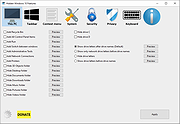 |
 |
Hidden Windows 7 Features v1.3.0 Hidden Windows 7 Features v1.3.0 Many useful features in Windows 7 are hidden. These features can be enable by editing Windows registry. Manual editing of registry is long and not so easy process. With Hidden Windows 7 Features are hidden features available with one click. Supported OS: Windows 7 Platform: 32bit, 64bit SHA256: b7d730b5e2688a7f1f93a9ed7cb4a9885aca407f5ae066f4ad6dc2fd9ad4f3af 1.3.0 (24/08/2018) added - Hide drives from your computer added - Taskbar thumbnail delay time added - Taskbar thumbnail live preview delay time added - Pin folder to Start menu added - Disable SMB1 protocol added - Disable SMB2 and SMB3 protocol added - Enable write protection for USB drives fixed - Turn off thumbnail live preview minor bug fixes Click here to visit the author's website. |
|
5,956 | Dec 05, 2019 Theropods Ltd 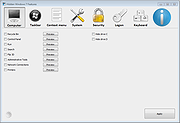 |
|
Show Hidden 1.0 Show Hidden 1.0 Show Hidden is a small utility that will display all hidden folders, and files if you wish, on your computer. This program will scan all of your fixed and removable drives for folders and files that have the Hidden attribute. When Show Hidden is finished it will create a log that contains a list of all the hidden files and folders that were found. |
 |
9,676 | Jan 12, 2022 Bleeping Computer |
| Showing rows 1 to 6 of 6 | Showing Page 1 of 1 | 1 |
OlderGeeks.com Copyright (c) 2026
