|

|
Processed through Paypal No account required. |








Buy our over-priced crap to help pay the bills.



|
|
Processed through Paypal No account required. |
| Files | ||||
| File Name | Rating | Downloads | ||
 |
NoVirusThanks File Governor (PORTABLE) v2.3.0.0 NoVirusThanks File Governor (PORTABLE) v2.3.0.0 NoVirusThanks File Governor is an advanced program which allows for files and folders within the system to be unlocked so that normal file I/O operations can be completed when normally they would not be able to be due to operating system restrictions for files currently in use. Once a file or folder is unlocked you will be able to force-close the file’s handle, rename, delete, etc. I am sure that at least one time, you have run into a situation where you wanted to delete a file, but Windows wouldn’t allow you to do it because the file was already in use by another program or because the access to the file you wanted to delete was denied for some reasons. In this case you should know these messages: The source or destination file may be in use Cannot delete file: Access is denied The file is in use by another program or user There has been a sharing violation Make sure the disk is not full or write-protected You can use NoVirusThanks File Governor to safely close all the opened handles of a file or to safely close all the opened files inside a folder so that you will be able to delete the files and the folder without problems. This tool is useful also to unlock files locked by malware or unload malicious DLL files. Key features and characteristics Unblock files and folders locked by other applications Terminate processes that lock a file or folder Scan files and folders for locked objects Close opened handles and unload loaded DLL modules Unload DLL modules loaded in running processes Unlock all locked objects with a single mouse click Scan files and folders ... |
 |
7,613 | Jan 12, 2022 NoVirusThanks Company 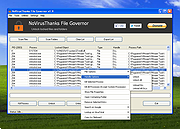 |
|
Process Governor v1.3.1 Process Governor v1.3.1 👉 Automate Windows process and service priority, I/O priority, and CPU affinity rules. Process Governor is a free Python-based Windows utility that automates the management of processes and services by applying user-defined rules for priority, I/O priority, and CPU core affinity. It can be used to fine-tune system responsiveness, control how selected programs use CPU cores, and automatically apply preferred settings to matching processes or services. Features: • Adjust process and service priorities • Control I/O priorities for better resource management • Set CPU core affinity for selected processes • Create rules for processes by name, path, or command line • Create rules for Windows services by service name • Supports wildcards in process and service rules • Optional force mode for continuous rule application • Optional delay before applying rules • View running process details including PID, executable path, service name, and command line • Search, sort, and filter process and service lists • System tray menu with access to settings, config file, log file, updates, startup option, and quit • Open file locations, file properties, and service properties from the process list • Undo, redo, hotkeys, and inline rule editing • Error highlighting for invalid rule entries • Optional auto-start with Windows Supported operating systems: • Windows 10 • Windows 11 Supported languages: English Changes: v1.3.1 04-19-25 Bug Fixes Fixed error messages: Resolved occasional error messages in the garbage collection process. Click here to visit the author's website. |
|
1,022 | Jun 15, 2026 System X - Files 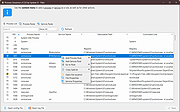 |
| Showing rows 1 to 2 of 2 | Showing Page 1 of 1 | 1 |
OlderGeeks.com Copyright (c) 2026
