|

|
Processed through Paypal No account required. |








Buy our over-priced crap to help pay the bills.



|
|
Processed through Paypal No account required. |
| Files | ||||
| File Name | Rating | Downloads | ||
 |
Everything v1.4.1.1032 Everything v1.4.1.1032 👉 Locate files and folders by name instantly. Everything is a fast Windows search engine that locates files and folders by filename instantly. It quickly indexes file and folder names, updates results in real time, and uses minimal system resources. Features: • Small installation file • Clean and simple user interface • Quick filename indexing • Quick searching • Minimal resource usage • Real-time updating • Content searching with the content: search function • Portable and installer versions available • x86, x64, ARM and ARM64 builds available • Multilingual support Supported operating systems: • Windows XP, Windows Vista, Windows 7, Windows 8, Windows 10, Windows 11 Supported languages: Afrikaans, Bosanski, Čeština, Dansk, Deutsch, English (AU), English (UK), English (US), Español (España), Español (Latinoamérica), Español (Venezuela), Estonia, Français, Hrvatski, Italiano, Kûrdî (Soranî), Kûrdî, Magyar, Nederlands, Norsk bokmål, Oʻzbekcha, Polski, Português (Brasil), Română, Shqip, Slovenčina, Slovenščina, Srpski, Suomi, Svenska, Tiếng Việt, Türkçe, Ελληνικά, Български, Македонски, Русский, Српски, Українська, עברית, عربي, ئۇيغۇرچە, বাংলা, فارسی, தமிழ், ภาษาไทย, བོད་ཡིག, 한국어, 日本語, 简体中文, 繁體中文 Changes: v1.4.1.1032 01-23-26 fixed a security issue with launching files ending with a dot (.) fixed an issue with the msi installer not stopping Everything. This download is for the Windows 64bit installer (very bottom of page). All other download assets are below: Windows Installer 32bit Everything-1.4.1.1032.x86-Setup.exe Windows Portable version: Everything-1.4.1.1032.x64.zip Everything-1.4.1.1032.x86.zip Everything-1.4.1.1032.ARM64.zip Everything-1.4.1.1032.ARM.zip Windows Lite installer version: Everything-1.4.1.1032.x64.Lite-Setup.exe Everything-1.4.1.1032.x86.Lite-Setup.exe Click here to visit the author's website. |
 |
7,616 | May 24, 2026 voidtools 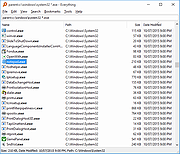 |
|
Flow Launcher v2.1.3 Flow Launcher v2.1.3 👉 Fast keyboard-driven launcher for finding apps, files, settings, bookmarks, and more on Windows. Flow Launcher is a quick file search and app launcher for Windows with community-made plugins. It is designed to help you search and launch applications, find files and file contents, run web searches, access browser bookmarks, use system and shell commands, search Windows and Control Panel settings, and extend functionality through a built-in plugin ecosystem. Features: • Search and launch applications from the keyboard • Search files and file contents using Everything or Windows Search • Run web searches with your preferred search engine • Search bookmarks from supported browsers • Access system commands such as restart, sleep, shutdown, lock, and settings • Run batch and PowerShell commands, including as Administrator or another user • Perform mathematical calculations and copy results to the clipboard • Search Windows settings and Control Panel settings • Browse and install community-made plugins from the plugin store • Supports custom themes, animations, sounds, and color schemes • Lets you display date and time in the search window • Supports portable use • Includes Game Mode to pause hotkey activation while gaming • Supports dialog jump for Open and Save As windows • Includes drag and drop support for files and folders • Lets you prioritize plugin result order • Includes a preview panel for supported items • Supports plugin development in C#, F#, Python, JavaScript, and TypeScript Hotkeys: • Alt + Space Open Flow Launcher (default hotkey, customizable) • Ctrl + Shift + Enter Run selected result as Administrator • Ctrl + Enter Open file location (Explorer) • Tab Autocomplete selected result • Enter Launch selected result • Esc Close Flow Launcher • ↑ / ↓ Navigate results list • Ctrl + C Copy selected result info (when supported) System Command List: • shutdown Shut down the computer • restart Restart the computer • sleep Put the computer to sleep • hibernate Hibernate the computer • lock Lock the current user session • signout ... |
|
715 | Aug 09, 2026 Flow Launcher Team 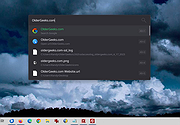 |
| Showing rows 1 to 2 of 2 | Showing Page 1 of 1 | 1 |
OlderGeeks.com Copyright (c) 2026
