|

|
Processed through Paypal No account required. |








Buy our over-priced crap to help pay the bills.



|
|
Processed through Paypal No account required. |
| Files | ||||
| File Name | Rating | Downloads | ||
 |
Email Password Dump 1.0 Email Password Dump 1.0 Email Password Dump is the free command-line based all-in-one tool to instantly recover all your passwords from popular email clients and other desktop applications. Currently it can recover your lost email passwords from following applications: Microsoft Outlook Express Microsoft Outlook 2002/XP/2003/2007/2010/2013 Mozilla Thunderbird Windows Live Mail 2012 IncrediMail Foxmail v6.x - v7.x Windows Live Messenger MSN Messenger Google Talk GMail Notifier PaltalkScene IM Pidgin (Formerly Gaim) Messenger Miranda Messenger Windows Credential Manager |
 |
9,914 | Feb 24, 2014 SecurityXploded |
|
InsideClipboard v1.30 InsideClipboard v1.30 👉 Displays the binary contents of files stored in the Windows clipboard. InsideClipboard is a small, portable utility that shows the binary data currently stored in the Windows clipboard. For every format available in the clipboard, it displays the name of the format, the handle, the size of the data, and a preview of the raw binary content in a standard hex dump view. InsideClipboard allows you to inspect text, images, HTML, Rich Text, and other custom clipboard formats in detail. It is especially useful for developers, advanced users, and anyone troubleshooting clipboard-related issues who needs to see exactly what data is being copied between applications. Features: • Displays all available clipboard formats • Shows format name, handle, and data size • Built-in hex dump viewer for binary data • Supports standard and custom clipboard formats • Refresh option to reload current clipboard contents • Portable application with no installation required Supported operating systems: • Windows 2000, Windows XP, Windows Server 2003, Windows Vista, Windows 7, Windows 8, Windows 10, Windows 11 Supported languages: English, Arabic, Dutch, French, German, Greek, Hungarian, Italian, Japanese, Korean, Polish, Portuguese, Russian, Simplified Chinese, Slovak, Spanish, Turkish Changes: v1.30 05-04-2018 Added "UTF-8" Display Mode. Note: Malwarebytes and other anti-virus software may block this as a "Machine Learning" app. We have confirmed this to be a false positive. The file is safe. Click here to visit the author's website. |
 |
10,302 | Jun 27, 2026 Nir Sofer 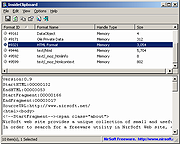 |
|
Live Kernel Memory Dump v1.0 Live Kernel Memory Dump v1.0 Live Kernel Memory Dump (LKMD) is an advanced Windows console utility that allows you to dump “live” kernel memory without having to force the system down (like you would with a bugcheck issued). No active kernel debug session is required which you normally would have in a debugger/debugee relationship. All kernel mode memory regions are dumped in a stable manner due to the underlying technology used in this utility which Windows uses itself to generate crash dump reports and is therefore reliable and stability isn't compromised even when memory is captured in a live system environment. For Windows 8.1, 10 (32\64-bit) Output is in proper dump format The resultant memory dump file is output in proper dump file format so viewing the details is as simple as loading the generated dump file within modern crash dump analysis tools such as WinDbg (e.g: WinDbg v10.0.16299.15) Multiple flags can optionally be specified during dump report generation, such as (Hypervisor Page inclusion, Compression of Page Data, Usermode Memory inclusion, etc.). LKMD is compatible with Windows 8.1 and newer (Windows 10). Whether you're into digital forensics or you are an Admin diagnosing a system infection this tool will come in handy and is recommended for advanced users only. Works on Live Systems No "active" kernel debug session is required to generate memory dump. Stable by Design Due to using Windows own Crash Dump API to generate output file. Multiple Dump Option Flags May optionally be used to influence the memory capturing process. Proper Dump File Format Support for modern versions of crash dump analysis tools (WinDbg v10.0 et al). Dump Kernel Mode Memory All kernel mode memory regions are properly dumped to disk file. Dump Usermode Memory Using optional flags you can include also usermode memory regions. Win 8.1 & Win 10 Compatible ... |
|
6,120 | Mar 15, 2019 NoVirusThanks 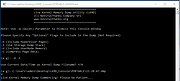 |
 |
WhoCrashed Free Home Edition v7.10 WhoCrashed Free Home Edition v7.10 👉 Analyze Windows crash dump files and identify the cause of system crashes. WhoCrashed Free Home Edition is a diagnostic utility designed to help users determine why their computer has crashed or become unstable. By analyzing crash dump files generated by Windows, it provides easy-to-understand reports that identify the drivers or system components responsible for Blue Screen of Death (BSOD) errors. WhoCrashed Free Home Edition simplifies complex debugging data into readable explanations, making it useful for both everyday users and technicians. It scans system logs and memory dump files, then presents a detailed analysis that highlights probable causes of crashes, including faulty drivers, hardware issues, or system misconfigurations. Features: • Analyzes Windows crash dump files and BSOD events • Identifies faulty drivers and probable crash causes • Provides clear, human-readable crash reports • Supports kernel, mini, and full memory dump analysis • One-click analysis with minimal technical knowledge required • Displays detailed system information for troubleshooting • Lightweight and fast operation Supported operating systems: • Windows 11, Windows 10, Windows 8.1, Windows 8, Windows 7, Windows Vista, Windows XP x64 editions, Windows XP SP3 32-bit editions • Windows Server 2022, Windows Server 2019, Windows Server 2016, Windows Server 2012, Windows Server 2008, Windows Server 2003 Supported languages: English Changes: v7.10 10-21-24 Certain dump files could not be analyzed due to a buffer overflow error Certain crash dump files could not be analyzed with WhoCrashed because of a "buffer overflow error". This would cause the program to terminate. This bug has been fixed. Updated debug DLLs The debug DLL versions used for analyzing crash dumps have been updated. Wrong bugcheck analysis problem fixed WhoCrashed could draw the wrong conclusion analyzing certain crash dumps. The analysis process has been improved to prevent this. Clicking on "cancel" during dump analysis could produce unexpected behavior Clicking the cancel button while a dump analysis process was in progress could give unexpected results. This problem ... |
|
10,490 | Mar 24, 2026 Resplendence Software Projects Sp. 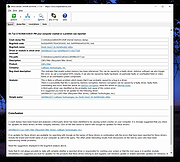 |
|
Windows License Key Dump 2.0 Windows License Key Dump 2.0 Windows License Key Dump is the free command-line tool to recover the product/serial Keys of Windows and other popular software. It automatically detects and decrypts the license/serial keys of over 200+ popular software programs including Office, SQL Server, Adobe, Nero and many more. Being a command-line tool makes it useful for penetration testers and forensic investigators. |
|
9,891 | Feb 10, 2014 Security Xploded |
| Showing rows 1 to 5 of 5 | Showing Page 1 of 1 | 1 |
OlderGeeks.com Copyright (c) 2026
