|

|
Processed through Paypal No account required. |








Buy our over-priced crap to help pay the bills.



|
|
Processed through Paypal No account required. |
| Files | ||||
| File Name | Rating | Downloads | ||
 |
Baby Computer Fun v1.1 Baby Computer Fun v1.1 Let babies and toddlers have fun playing with the computer. An educational game for people with babies and small children who like to sit at their parent's computer and smash the keyboard. Every time a key is pressed, a letter is drawn. Help kids to learn letters and provide a safe environment to have fun "typing" on the keyboard. The software prevents babies from accidentally opening any programs or documents, and makes banging even more fun by displaying letters and playing random sounds as the keys are whacked. Your own sounds can also be used. You can also click with the mouse to play an animation at a particular location. The software will lock out the Windows Key, as well as Ctrl-Esc and Alt-Tab so your baby can't get out of the application. Pressing ALT-F4 will exit the application. Supports: Windows Windows 10/8.1/8/7/Vista/XP (32-bit and 64-bit) Language: English License: Freeware Baby Computer Fun 1.1 March 14, 2020 This version fixes some bugs Click here to visit the author's website. |
 |
3,828 | Dec 09, 2020 Vovsoft 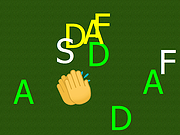 |
 |
Input Director v2.3 Input Director v2.3 Enables the control of multiple Windows systems using the keyboard/mouse attached to one computer. Switch control between systems either by hotkey or by moving the cursor to the screen edge on one computer for it to appear on the next one Input Director supports a shared clipboard - copy on one computer, switch control, and paste. Supported operating systems: Windows 11, Windows 10, Windows 8/8.1 and Windows 7. The systems must be networked. Supported languages: English Features Easy to Use • Easy to follow installation and usage guides - setup only takes a few minutes • Input Director's flexible monitor layout system makes it easy to accurately reflect a monitor's physical location and size: • Multi-monitor support • Shared Clipboard - copy and paste between computers (including files!) • Compatible with Windows 11, Windows 10, Windows 8/8.1 and Windows 7 • Only Input Director ensures the cursor remains visible and correct if the mouse is disconnected on a Windows 10 or Window 11 system • Transitioning control to another computer is as simple as moving your cursor off the screen on one computer for it to jump to the other • Able to control a computer without needing to login to it first Supports Windows fast user switching • Compatible with Windows User Account Control pop-ups Manage all your computers at once • Simultaneously lock all computers • Import/Export Input Director configuration and apply configuration updates from the command line • Synchronize screensavers across your computers • Synchronize shutdown of your system (or individually configure whether a computer goes to standby, hibernate or shuts down) • Wake systems over the network Security • Encrypt network data between Input ... |
|
4,861 | Feb 09, 2026 Shane Richards 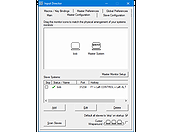 |
|
MAME v0.289 MAME v0.289 👉 Multi-purpose emulation framework for preserving and running vintage arcade, computer, console, and calculator software. MAME is a multi-purpose emulation framework designed to preserve decades of software history by documenting and reproducing the inner workings of arcade machines, computers, consoles, calculators, and many other electronic systems. It can emulate over 32,000 individual systems, and the official Windows binaries provide both GUI and command-line operation. Features: • Preserves and documents vintage hardware and software through emulation. • Emulates arcade machines, computers, video game consoles, calculators, and other electronic systems. • Can currently emulate over 32,000 individual systems. • Official Windows binaries support both graphical and command-line use. • Includes extensive official documentation for setup, usage, configuration, plugins, debugger tools, and external utilities. • Version 0.287 adds broad emulation improvements including better Namco System 23 graphics, improved Sega Model 3 lighting, improved Philips CD-i audio handling and stability, GRiD Compass keyboard updates, and Apple II improvements. MAME Documentation https://docs.mamedev.org/ Supported operating systems: • Windows 7 or later (64-bit x86-64), Windows 10 or later (ARM64) Supported languages: English, Multiple languages via community translation files Changes: v0.289 07-31-26 What's new. This download is for the Windows 64bit version (very bottom of page). If you need the Windows ARM64 version, download here. Click here to visit the author's website. |
|
9,236 | Aug 04, 2026 MAME team 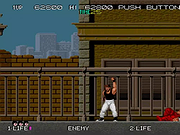 |
|
PokerTH Portable v2.1.3 PokerTH Portable v2.1.3 👉 Play Texas Hold'em poker against computer opponents or online players without installation. PokerTH Portable is the portable version of the free, open-source Texas Hold'em poker game. Play locally against computer-controlled opponents, compete with other players over a network or join games through the online PokerTH community. Games can include up to ten computer or human players. The program includes customizable cards, table themes and player avatars, along with online chat, sound effects, player statistics and configurable game rules. Since this edition is portable, it can run from a USB drive, cloud folder or local directory while keeping its settings with the program. Features: • Play Texas Hold'em poker against computer-controlled opponents • Join online multiplayer games through the PokerTH community • Create custom internet or local network games • Supports up to ten human or computer players • Spectate games already in progress • Customizable card decks, table themes and avatars • Online chat with emotes and player controls • Local and community player statistics • Configurable game rules and betting settings • Sound effects and an easy-to-use graphical interface • Runs from portable, cloud or local storage without traditional installation • Saves personal settings and game data within the portable folder Supported operating systems: • Windows 10, Windows 11 Supported languages: Afrikaans, العربية (Arabic), Беларуская (Belarusian), Български (Bulgarian), Català, 中文 (简体) (Chinese Simplified), 中文 (繁體) (Chinese Traditional), Hrvatski (Croatian), Čeština (Czech), Dansk (Danish), Nederlands (Dutch), English, English (British), Esperanto, Español (Spanish), Español (Alfabetización Internacional), Eesti (Estonian), Euskera (Basque), فارسی (Persian), Filipino, Suomi (Finnish), Français (French), Galego (Galician), Gàidhlig (Scottish Gaelic), ქართული (Georgian), Deutsch (German), Ελληνικά (Greek), עברית (Hebrew), हिन्दी (Hindi), Magyar (Hungarian), Íslenska (Icelandic), Igbo, Italiano (Italian), 日本語 (Japanese), ಕನ್ನಡ (Kannada), 한국어 (Korean), Kurdî (Kurdish), Latviešu (Latvian), Lëtzebuergesch (Luxembourgish), Lietuvių (Lithuanian), Македонски (Macedonian), Malagasy, मराठी (Marathi), Монгол Кирилл (Mongolian Cyrillic), Norsk (Norwegian), Norsk (nynorsk), Oʻzbek (Uzbek), Polski (Polish), Português (Portuguese), Português Brasileiro (Brazilian Portuguese), ... |
|
5,700 | Jul 22, 2026 PokerTH Team & PortableApps.com 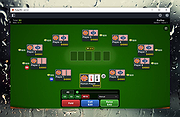 |
|
Workrave v1.10.54 Workrave v1.10.54 👉 Helps prevent repetitive strain injuries by reminding you to take healthy computer breaks. Workrave is a free and open-source program designed to help prevent and relieve Repetitive Strain Injury (RSI) and other computer-related health issues. It monitors keyboard and mouse activity and reminds users to take regular breaks from their computer to rest, stretch, and relax. The software provides configurable microbreaks, rest breaks, and daily usage limits to encourage healthier work habits. By tracking input activity and detecting idle time, Workrave can intelligently determine when breaks are needed and provide gentle reminders before enforcing them if necessary. During breaks, Workrave may display simple exercises or relaxation prompts to help reduce muscle tension and eye strain caused by prolonged computer use. Break timers and reminder behavior are fully customizable, allowing users to tailor break frequency, duration, and enforcement settings to their workflow. Workrave runs quietly in the background and integrates with the system tray, making it suitable for both home and workplace environments where long computer sessions are common. Features: • Monitors keyboard and mouse activity to detect continuous computer use • Reminds users to take microbreaks, rest breaks, and daily usage limits • Fully configurable break timers and durations • Gentle break reminders with optional enforced breaks • Microbreaks for short pauses and longer rest breaks for recovery • Tracks active and idle time to intelligently manage break timing • Optional exercises and stretching prompts during breaks • Postpone or skip options for break reminders • System tray integration and automatic startup options • Free and open-source software Supported operating systems: • Windows • Linux Supported languages: System language (Workrave uses the operating system's locale for its interface language). Changes: v1.10.54 10-16-25 Add support for GNOME Shell 49 (#636, Alessandro Astone) Note: This file has two hits on VirusTotal. We have confirmed these to be false positives. The file is safe. This download is for the Windows version (very bottom of ... |
|
4,489 | Mar 04, 2026 Raymond Penners & Rob Caelers 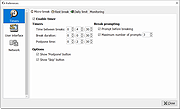 |
| Showing rows 1 to 5 of 5 | Showing Page 1 of 1 | 1 |
OlderGeeks.com Copyright (c) 2026
