|

|
Processed through Paypal No account required. |








Buy our over-priced crap to help pay the bills.



|
|
Processed through Paypal No account required. |
| Files | ||||
| File Name | Rating | Downloads | ||
 |
FSterm v1.2.4 FSterm v1.2.4 👉 A lightweight ANSI terminal emulator with serial, TCP, and UDP connectivity. FSterm is a lightweight, high-performance ANSI terminal designed for communicating with serial and network-connected devices without unnecessary complexity. Despite its compact portable size, it delivers an impressive feature set for developers, technicians, and hardware enthusiasts. Connect through serial ports or over TCP and UDP, enjoy comprehensive ANSI terminal emulation with truecolor support, multiple terminal sizes, mouse selection, and flicker-free rendering, then take advantage of the powerful GrafANSI© extension to display images, diagrams, shapes, pointers, layered graphics, and device-triggered audio across the same connection. Version 1.2.4 further improves performance with significantly faster rendering, smoother scrolling, expanded screenshot capabilities, command-line automation, customizable cursor styles, a wider baud rate range up to 921600, Slim-GUI mode, and permanent background image support, making FSterm a fast, flexible, and capable terminal for everything from embedded development to industrial equipment and diagnostics. Features: • Lightweight ANSI terminal emulator with a portable, no-installation design. • Connect to serial (COM) ports. • Connect to remote devices over TCP. • Connect to remote devices over UDP. • Enhanced ANSI terminal emulation with scrolling regions, alternate screen buffer, cursor position reporting, adjustable tab stops, autowrap and origin modes. • Supports truecolor ANSI text and an audible terminal bell. • Four selectable terminal sizes from 80×24 through 132×25. • Mouse text selection and copy support. • Flicker-free terminal rendering. • GrafANSI© graphics extension for displaying PNG and JPEG images directly from connected devices. • Draw lines, rectangles, circles, ellipses, arrows, and hand pointers from remote devices. • Supports layered graphics with visibility control, transparent colors, and zooming. • Devices can trigger local WAV audio playback. • Disk image caching for faster redisplay of graphics. • Free while in public beta. Supported operating systems: • Windows 10 (64-bit), Windows 11 (64-bit) Supported languages: English Changes: v1.2.4 07-30-26 Improved display performance with approximately 30-40% faster screen rendering for smoother scrolling, reduced lag with large ... |
 |
326 | Aug 01, 2026 Funciona Systems 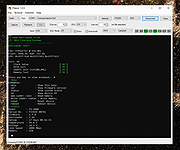 |
|
Web Link Communications Security Inspector v1.3.2.0 Web Link Communications Security Inspector v1.3.2.0 Safely inspect and analyze suspicious web links from email or other messages before opening them in your web browser. About: This application inspects communications used in URIs without compromising your endpoint security and privacy. Just read and accept the built-in EULA to use the application's fully enabled features. A User's Guide is bundled along with the Application in the .zip file. More info, licensing and uses: The application may be used at no cost after reading and accepting the built-in EULA. Web Link Communications Security Inspector safely provides useful analytical information on web link communications whether you use it in a professional setting or personally from your own computer. In addition to analyzing suspicious web links from your email or other messaging system, you can also use this application to diagnose or validate communications with your company webservers or with your personal webserver before setting them up live on the Internet. This application may also be useful in security awareness training scenarios, to illustrate how the security of protocols used often varies from link-to-link or when client or server configurations place constraints on TLS negotiation. SHA-256: 2186f8898e92517f1838a3d1bc10c81a96be35d2bc052ee5023be26d3423df19 Requirements: x64 .NET® 6 Desktop runtime must be installed before using this application. Get it from Microsoft. Click here to visit the author's website. |
|
2,989 | May 22, 2022 Steve Chaison Software 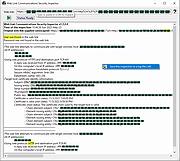 |
| Showing rows 1 to 2 of 2 | Showing Page 1 of 1 | 1 |
OlderGeeks.com Copyright (c) 2026
