|

|
Processed through Paypal No account required. |








Buy our over-priced crap to help pay the bills.



|
|
Processed through Paypal No account required. |
| Files | ||||
| File Name | Rating | Downloads | ||
 |
Bluetooth Version finder v1.7 Bluetooth Version Finder v1.7 👉 Quickly find the Bluetooth version supported by your Windows computer. Bluetooth Version Finder is a portable freeware tool that displays your computer's Bluetooth version number without manually checking Device Manager or matching LMP firmware numbers by hand. Features: • Shows the Bluetooth version number quickly • Helps avoid manual Device Manager lookup • Displays Bluetooth adapter details under the main version number • Supports Bluetooth versions up to 6.2 • Portable, unzip and run • Includes command-line parameter support • Can show a question mark icon if detection fails Supported operating systems: • Windows 11, Windows 10 Supported languages: English Changes: v1.7 02-11-26 [ ADDED ] - Bluetooth version 6.2 support. [ ADDED ] - Bluetooth version 6.1 support. [ ADDED ] - Improvements in program codes. Click here to visit the author's website. |
 |
6,430 | May 08, 2026 Sordum.org 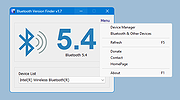 |
 |
Nearby Glasses v1.0.8 Nearby Glasses v1.0.8 👉 Detects nearby smart glasses using Bluetooth Low Energy signals. Nearby Glasses is a free, open-source utility designed to detect nearby smart glasses by passively scanning Bluetooth Low Energy (BLE) advertising data. The app identifies supported smart glasses using Bluetooth manufacturer identifiers and can notify you when a compatible device is detected within range. Detection is based solely on publicly broadcast BLE advertising frames and does not establish a connection with other devices or transmit any of your data. The developer notes that false positives and missed detections are possible, as some non-glasses devices may use the same manufacturer identifiers. The project is licensed under the GNU AGPL v3.0 and is available for both Android and iOS.      Features: • Passively scans Bluetooth Low Energy (BLE) advertisements • Detects supported smart glasses using manufacturer identifiers • Adjustable RSSI threshold to control detection sensitivity • Configurable notification cooldown • Canary Mode for iOS operation • Optional scan log display • Processes all scan data locally on the device • Does not establish Bluetooth connections or pair with devices • No advertisements or user tracking • Free and open source under the AGPL v3.0 license Supported operating systems: • Android 8.0 (Oreo) or higher • iOS 17.0 or higher Supported languages: English, French, German, Swiss German, Italian, Portuguese (Brazil), Spanish Changes: v1.0.8 07-16-26 added fixes to Russian translation (partly) added support for HeyCyan (Nilox Smart AI Glasses, sold by ALDI/Hofer) added support for RollMe and Rogbird fixed some minor bugs      This download is for the Android APK file (very bottom of page). All other download assets are below: F-Droid APK: yj_nearbyglasses_1.0.8-izziFdroid.apk Or: Click here to visit the author's website. |
|
308 | Jul 17, 2026 Yves Jeanrenaud 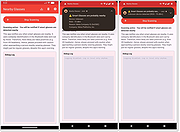 |
|
OpenLogi v0.6.3 OpenLogi v0.6.3 👉 A local-first Logitech mouse configurator for macOS with no account, cloud or telemetry. OpenLogi is a native, open-source alternative to Logitech Options+ that lets you remap Logitech mouse buttons, control DPI, adjust SmartShift wheel behavior and use per-app profiles directly over HID++. It works locally on your Mac, stores settings in a plain TOML config file, and does not require a Logitech account, cloud service or telemetry. Features: • Remap Logitech mouse buttons from a native macOS interface • Built-in action catalog plus custom keyboard shortcut recording • DPI control with presets and cycle/set-preset actions • SmartShift wheel control for ratchet, free-spin and automatic switching • Per-application profiles that switch when the focused app changes • Supports Logi Bolt, Bluetooth-direct and wired USB connections • Live paired-device carousel with battery percentage and charge state • Plain-text TOML configuration • No Logitech account required • No telemetry, analytics or cloud sync • Open source and dual licensed under MIT / Apache-2.0 • Signed and notarized macOS DMG available Supported operating systems: • macOS Supported languages: English, Danish, German, Greek, Spanish, Finnish, French, Italian, Japanese, Korean, Norwegian Bokmεl, Dutch, Polish, Portuguese (Brazil), Portuguese (Portugal), Russian, Swedish, Simplified Chinese, Traditional Chinese (Hong Kong), Traditional Chinese (Taiwan) Changes: v0.6.3 06-09-26 • Added unified Binding model and gesture-button menu. • Added gesture buttons on Middle, Back and Forward via the OS hook. • Release v0.6.3. This download is for the macOS ARM64 version (very bottom of page). If you need the macOS Intel version, download here. Click here to visit the author's website. |
|
468 | Jun 10, 2026 AprilNEA 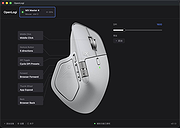 |
| Showing rows 1 to 3 of 3 | Showing Page 1 of 1 | 1 |
OlderGeeks.com Copyright (c) 2026
