|

|
Processed through Paypal No account required. |








Buy our over-priced crap to help pay the bills.



|
|
Processed through Paypal No account required. |
| Files | ||||
| File Name | Rating | Downloads | ||
 |
Blank And Secure v8.44 Blank And Secure v8.44 👉 Securely delete files to prevent recovery. Blank And Secure is a small, portable tool designed to securely delete files so they cannot be recovered by any data recovery software. It overwrites selected files multiple times using different patterns, ensuring that sensitive data is permanently erased. The program is lightweight, requires no installation, and is ideal for users who want a quick and reliable way to securely remove confidential files. Features: • Secure file deletion with multiple overwrite passes • Prevents recovery by standard and advanced recovery tools • Adjustable overwrite count for customizable security • Drag-and-drop support for quick file handling • Portable, no installation required • Very small footprint and low system resource usage • Simple and user-friendly interface Supported operating systems: • Windows 7, Windows 8, Windows 10, Windows 11 Supported languages: German, English, Russian, Dutch, Romanian, Swedish, French, Italian, Turkish, Arabic, Spanish, Bulgarian, Greek, Portuguese (Brazil), Chinese Simplified, Czech, Korean, Chinese Traditional, Polish, Thai, Indonesian, Japanese, Hungarian, Norwegian, Portuguese, Danish, Irish, Vietnamese, Spanish (Venezuela), Hebrew, Malay, Filipino, Finnish, Afrikaans, Bosnian, Ukrainian Changes: v8.44 08-27-2026 • BlankAndSecure language file update • Minor fine-tuning in BlankAndSecure for all Windows operating systems This download is for the Windows 64bit version (very bottom of page). All other download assets are below: Other Windows: BlankAndSecure.zip (32bit) BlankAndSecure_Win98.zip (Windows 98) Click here to visit the author's website. |
 |
7,380 | Sep 07, 2026 Nenad Hrg 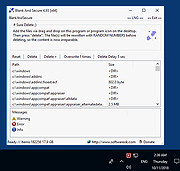 |
|
Multiscreen Blank v2.6.0.0 Multiscreen Blank v2.6.0.0 Blank, dim, and mirror your screens in a multi-monitor setup Improve focus by blanking out unused screens. Dim screens to reduce eyestrain. Group screens together for one-touch operations affecting all screens in a group. Recover off-screen programs without turning on the physical display or stream parts of a screen to another. Cover parts of a screen to temporarily hide sensitive information or reduce OLED burn-in. And more... Multiscreen Blank v2 is an easy-to-use utility that allows you to independently blank out or dim one or more monitors connected to your computer, as well as mirroring the contents of screens that are physically located in another room or turned off. Monitors fade in and out with smooth transitions. Some possible uses include: Fading out a projector during a presentation while switching slides Blanking out unused monitors in a multi-monitor setup to reduce distraction Selectively blanking out parts of a commercial video wall Dimming one or more screens while continuing to use them Preventing OLED burn-in by covering up bright static elements or displaying inverted versions of them Masking parts of the screen by pixelizing a floating screenshot Turning unused monitors into ambient lights for video chats by blanking with a white screen Screen mirroring for monitors that may be physically located in another room or turned off This is a major update to the original Multiscreen Blank application that has developed a small but devoted following of users. The update brings a reimagined, considerably more intuitive user interface and includes many new features requested by users over the years. It even supports dark themes! How to Use The Basics Multiscreen Blank displays your current monitor ... |
|
3,241 | Oct 25, 2021 Alexey "Lyosha" Blinnikov 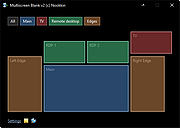 |
| Showing rows 1 to 2 of 2 | Showing Page 1 of 1 | 1 |
OlderGeeks.com Copyright (c) 2026
