|

|
Processed through Paypal No account required. |








Buy our over-priced crap to help pay the bills.



|
|
Processed through Paypal No account required. |
| Files | ||||
| File Name | Rating | Downloads | ||
 |
All Bitdefender Uninstall Tools v3.0 All Bitdefender Uninstall Tools v3.0 👉 The complete collection of Bitdefender consumer and business removal tools in one ZIP file. All Bitdefender Uninstall Tools is a collection compiled by OlderGeeks containing official Bitdefender removal utilities for current and older consumer and business security products. Instead of downloading each utility separately, you can keep the entire collection together for troubleshooting and computer repairs. These tools help remove Bitdefender software when normal uninstallation fails or leaves remnants behind. They can be useful when preparing to reinstall Bitdefender or replace it with another security solution. Extract the ZIP file, identify the installed Bitdefender product and choose its corresponding removal tool. Consumer and business products require different utilities. Older product generations also have their own uninstallers, so selecting the appropriate tool matters. Consumer product coverage: • Latest Generation Bitdefender Antivirus Plus, Internet Security and Total Security. • Bitdefender Antivirus Plus, Internet Security and Total Security from the 2020 generation. • Bitdefender Antivirus Plus, Internet Security and Total Security from the 2019 generation. • Bitdefender Antivirus Plus, Internet Security and Total Security from the 2018 generation. • Bitdefender Antivirus Plus, Internet Security and Total Security from the 2017 generation. • Bitdefender Antivirus Plus, Internet Security and Total Security from the 2016 generation. • Bitdefender Antivirus Plus, Internet Security and Total Security from the 2015 generation and older, as covered by Bitdefender's corresponding tool. Business product coverage: The collection includes current and legacy business removal utilities, including separate tools for Bitdefender Endpoint Security Tools (BEST) v7 and v8, along with older endpoint uninstallers. Bitdefender's current business support page directs users of BEST up to v6.4.x to contact support. Although legacy utilities are included in this collection, additional assistance may be necessary for older installations. Features: • Complete collection ... |
 |
5,188 | Oct 09, 2026 BitDefender Labs / Oldergeeks.com 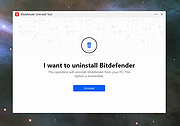 |
 |
BitDefender Antivirus Free Edition v27.0.62.352 BitDefender Antivirus Free Edition v27.0.62.352 👉 Free real-time antivirus protection for Windows PCs. BitDefender Antivirus Free Edition provides lightweight, cloud-powered antivirus protection designed to defend Windows computers against viruses, malware, ransomware, phishing attacks, and other online threats. It uses Bitdefender’s award-winning security technologies while maintaining a simple “install and forget” approach that runs quietly in the background without slowing down your system. The program delivers real-time threat detection, automatic malware scanning, web attack prevention, anti-phishing protection, and malicious website blocking. It also includes integrated Bitdefender VPN access with limited daily encrypted traffic for safer browsing. BitDefender Antivirus Free Edition is optimized for gaming, multimedia editing, and other resource-intensive activities by minimizing system impact while maintaining continuous protection. Features: • Real-time antivirus and malware protection • Cloud-powered threat detection • Advanced anti-phishing protection • Malicious website and scam blocking • Automatic security updates • Lightweight system resource usage • Optimized for gaming and multimedia tasks • Integrated Bitdefender VPN with limited daily traffic • Automatic threat remediation and quarantine • Simple install-and-forget interface • Web traffic scanning • Protection against ransomware and online threats Supported operating systems: • Windows 7 SP1, Windows 8.1, Windows 10, Windows 11 Supported languages: English, German, French, Spanish, Italian, Romanian, Dutch, Swedish, Chinese Traditional, Chinese Simplified, Portuguese, English UK, English AU Changes: v27.0.62.352 08-20-26 Fixed an issue where protection review reports included monitored web and email activity even when the related protection features were disabled Fixed an issue where Bitdefender services were not responding at startup Fixed an issue where Bitdefender services could appear unresponsive while the product remained functional Fixed an issue where SecurePass could not remain disabled in Safepay Fixed an issue causing continuous notifications about webcam access Fixed an issue where the verified links counter reset to zero after rebooting on Windows 11 Fixed an issue causing multiple firewall notifications stating that an application had changed Note: BitDefender Antivirus Free Edition requires you to create a free account. Click here to ... |
|
11,998 | Aug 27, 2026 BitDefender Labs 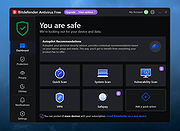 |
|
Bitdefender Antivirus Free for Android v8.26.24 Bitdefender Antivirus Free for Android v8.26.24 Take Bitdefender’s award-winning antivirus protection with you! Bitdefender's Antivirus Free is a powerful and fast solution that uses in-the-cloud scanning technology to arm your Android device with the very latest industry leading virus detection. Without slowing down your Android or draining your battery. Simply install on your Android and it’s ready to go—nothing to configure. Unparalleled Detection Autopilot automatically scans any new apps that are downloaded to your Android device for viruses. Antivirus Free uses the same scanning engines as Bitdefender Mobile Security-our flagship mobile security app that has been independently certified to catch more than 99% of all viruses targeted at Android devices. This powerful scanner keeps you protected 24/7 against malicious activities. Feather-Light Performance Instead of downloading and storing virus signatures directly to Android devices, Antivirus Free uses in-the-cloud services to check online for the latest safeguards to outbreaks. This not only results in super-fast scans, but in close to zero impact on battery life and device performance. Hassle-Free Operation Don't worry. Ever. You can sleep but Autopilot, a smart on-install scanner that checks all apps for suspicious activity, won't. Threats and viruses are blocked before any damage is done. Zero Configuration Bitdefender Antivirus Free offers you essential antivirus protection against all Android threats. It is ready to go right after installation, acting as an effective guardian against mobile malware. Moreover, the Autopilot automatically scans any new apps you install. Click here to visit the author's website. |
|
27,972 | Aug 29, 2024 Bitdefender |
|
Bitdefender Home Scanner 1.0 Bitdefender Home Scanner 1.0 Scan for weaknesses and hidden backdoors into your home Bitdefender Home Scanner is a free tool that scans your Wi-Fi network, maps devices and identifies and highlights network security flaws. Bitdefender Home Scanner looks for weak passwords, as well as vulnerable or poorly encrypted communications. It correlates the information gathered from your connected devices with online vulnerability databases and gives you a thorough report so you can ensure maximum security for your network. Map your home network Scan open ports in the network Wi-Fi scanner: identify all connected devices and security risks Complementary to and compatible with all existing security tools Why use Bitdefender Home Scanner New software vulnerabilities are being discovered in many smart devices every day, and hackers are taking advantage of these security flaws to target homes and businesses. It is time to start thinking about the security of your smart devices. Recently, a mom who had installed a smart surveillance system in her home discovered that someone had hacked into a webcam and live-streamed her daughters’ room on the Internet. There have been numerous reports about light bulbs being hacked. In one case, a security company demonstrated that unauthorized persons could hack into a home network by posing as a new light bulb joining the system. This way the other light bulbs were tricked into giving away the username and password for the network. Moreover, hackers can take advantage of vulnerabilities to take control of vast numbers of smart devices and use them to launch massive attacks against commercial and government websites. Technical Details Minimum system requirements: Windows 7 SP 1, 8, 8.1, 10 CPU: Dual Core 1.6 GHz RAM: 1 GB HDD: 300 MB Recommended system requirements: Windows 7 SP ... |
|
6,224 | Nov 13, 2019 BitDefender Labs 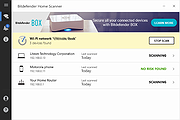 |
|
Bitdefender Ransomware Recognition Tool v1.0.0.2 Bitdefender Ransomware Recognition Tool v1.0.0.2 A tool to help ransomware victims find which family and sub-version of ransomware has encrypted their data and then get the appropriate decryption tool, if it exists. Ransomware has grabbed the headlines ever since 2014. While most ransomware attacks can’t be defeated, Bitdefender constantly creates and updates ransomware decryption tools for families that have either vulnerable encryption algorithms or for which a master decryption key has been leaked. This tool analyzes both the ransom note and the encrypted file samples to identify the strain of ransomware and suggest a decryption tool for the identified family, if such a tool is available. Step 1 Download the BRR tool and save it somewhere on your computer. The latest version is always available here. This tool requires an active internet connection. Step 2 Run the BDRansomRecognitionTool.exe and allow it to execute if prompted by an UAC alert. Step 3 Read and agree to the End User License Agreement Step 4 The application has two fields to fill in: Choose the path to the ransom note file or the path to a folder containing encrypted files. You can choose either option, but the tool needs at least one of the pieces of information to detect which strain of ransomware has encrypted your information. If none of the fields are filled in, you cannot proceed any further Step 5 Press Scan. The application gives a warning if the ransom-note path is not filled in, as the detection accuracy is slightly lower in this case. The content of the ransom note is submitted for analysis to Bitdefender cloud. If the user provides any encrypted file, NO file content will be submitted to our cloud, as the tool only analyzes the filename and its extension. If the ransomware family cannot be identified, the user is informed about this. In some cases, multiple families of ransomware display similar features. ... |
|
6,203 | Nov 13, 2019 BitDefender Labs 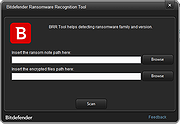 |
| Showing rows 1 to 5 of 5 | Showing Page 1 of 1 | 1 |
OlderGeeks.com Copyright (c) 2026
