|

|
Processed through Paypal No account required. |








Buy our over-priced crap to help pay the bills.



|
|
Processed through Paypal No account required. |
| Files | ||||
| File Name | Rating | Downloads | ||
 |
DNS Angel v1.8 DNS Angel v1.8 Aids in protecting your family from inappropriate websites by blocking them automatically. The internet is vast and uncensored, and can be the source of material that is damaging to young minds. Parents should play an active role in making sure that corrupting websites are being filtered and blocked , That is why DNS Angel can help. DNS Angel is portable and completely free. If you click on any button in the software interface, you will start using one of the secure dns. The software applies the corresponding secure dns change on all network cards when one of the buttons is clicked. Use the “Default Dns” button to return to your default dns settings. If secure dns has ipv6 support, the software will automatically assign secure ipv6 dns . If you want to go back to your previous dns before using dns angel, all you need to do is use the Restore Dns button. The DOH feature On/Off buttons will only be visible in Windows 11 and you can turn DOH features on or off for IPv4 or IPv6 individually. To toggle the button sound, click the sound icon located to the left of the Info & Donate button in the bottom left corner. To aid in blocking inappropriate websites, DNS Angel uses only family safe DNS IP’s. For more info, please visit Family Safe DNS providers: Cloudflare Family, Open Dns Family, Yandex Family, Clean Browsing. How to Add your own DNS IP addresses In this release DNS Angel read DnsAngel.ini file to show safe DNS ip addresses , this allows you to change the dns ips easily. If you want to add your own Dns address, right click DnsAngel.ini file and open it with Notepad or any other text editor , find the [DnsAngel_list] line and edit following DNS Adresses and Names. Important: The ... |
 |
6,925 | Jul 10, 2025 Sordum.org 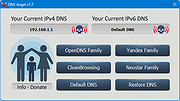 |
| Showing rows 1 to 1 of 1 | Showing Page 1 of 1 | 1 |
OlderGeeks.com Copyright (c) 2026
