|

|
Processed through Paypal No account required. |








Buy our over-priced crap to help pay the bills.



|
|
Processed through Paypal No account required. |
| Files | ||||
| File Name | Rating | Downloads | ||
 |
Linux Reader v5.2 Linux Reader v5.2 👉 Free tool for safely accessing Linux and other file systems from Windows. Linux Reader by DiskInternals is a free Windows utility for accessing files and folders stored on Linux, macOS and other file systems that Windows does not normally recognize. It provides safe, read-only access to source drives, allowing you to browse, preview and copy files without modifying the original file system. It can work with internal and external drives, USB flash drives, memory cards and other supported storage devices. Features: • Provides read-only access to supported file systems to help protect source data • Browses files and folders using a Windows Explorer-style interface • Extracts and saves accessible files to Windows storage • Previews supported files before saving them • Supports Ext2, Ext3 and Ext4 Linux file systems • Supports ReiserFS and Reiser4 • Supports HFS and HFS+ in reader mode • Supports FAT and exFAT • Supports NTFS and ReFS • Supports UFS2 and RomFS • Supports APFS in reader mode • Supports RAID 0, RAID 1, RAID 4, RAID 5, RAID 50, RAID 10 and JBOD • Accesses supported partitions that Windows cannot normally open • Works with internal and external HDDs and SSDs, USB drives and other storage media • Bypasses Linux file access permissions when reading attached Linux storage • Creates disk images for backup or recovery work • Keeps the original file system unchanged while browsing and extracting data Supported operating systems: • Windows XP, Windows Vista, Windows 7, Windows 8, Windows 8.1, Windows 10, Windows 11 • Windows Server 2003 through Windows Server 2025 Supported languages: English Changes: v5.2 08-20-26 Not Provided. Click here to visit the author's website. |
 |
7,763 | Aug 25, 2026 DiskInternals, ltd. 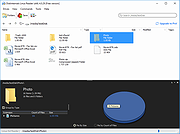 |
 |
OpenDisk v1.2.2 OpenDisk v1.2.2 👉 See what is using your Mac’s storage with a fast, interactive disk map. OpenDisk is a free, open-source disk space analyzer for macOS. It scans a drive or selected folder and displays the results in an interactive sunburst chart alongside a sortable folder list. Results appear while the scan is running, and you can click through folders to find large files. Incremental rescans reuse earlier results to check for changes more quickly. Full Disk Access is needed for accurate whole-drive totals. Features: • Interactive sunburst chart shows how folders and files use space. • Live results appear during a scan. • Sortable folder list and breadcrumbs help you navigate the results. • Search the scanned file tree as you type. • Incremental rescans check for changes since the previous scan. • Quick Look previews let you inspect selected files. • Collector lets you gather files and folders, review their combined size, and delete them together. • Shows a breakdown of purgeable space and recognizes connected external drives. • Automatic updates through Sparkle. Supported operating systems: • macOS Sequoia 15 or higher, Apple Silicon and Intel Macs Supported languages: English Changes: v1.2.2 09-23-26 • Hard-linked files are counted once after a quick rescan. • HFS+ drives now use the same scanner as APFS, fixing oversized totals and enabling fast rescans. • Clearer wording in a few messages. Click here to visit the author's website. |
|
61 | Sep 24, 2026 Andeli Goli 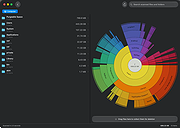 |
| Showing rows 1 to 2 of 2 | Showing Page 1 of 1 | 1 |
OlderGeeks.com Copyright (c) 2026
