|

|
Processed through Paypal No account required. |








Buy our over-priced crap to help pay the bills.



|
|
Processed through Paypal No account required. |
| File - Download TakeStock v2.0 R78 | ||||||||
| Description | ||||||||
|
Always scroll to the bottom of the page for the main download link. We don't believe in fake/misleading download buttons and tricks. The link is always in the same place. TakeStock v2.0 R78 👉 Completely free personal investment management software for Windows. TakeStock 2 is a free, full-featured personal investment management program that helps you track stocks, ETFs, mutual funds, dividends, capital gain distributions, margin equity and cash flow. It can display charts, retrieve historical prices, show company information, provide delayed price quotes, alert you when target buy or sell prices are reached and help identify short and long term gains for tax reporting. 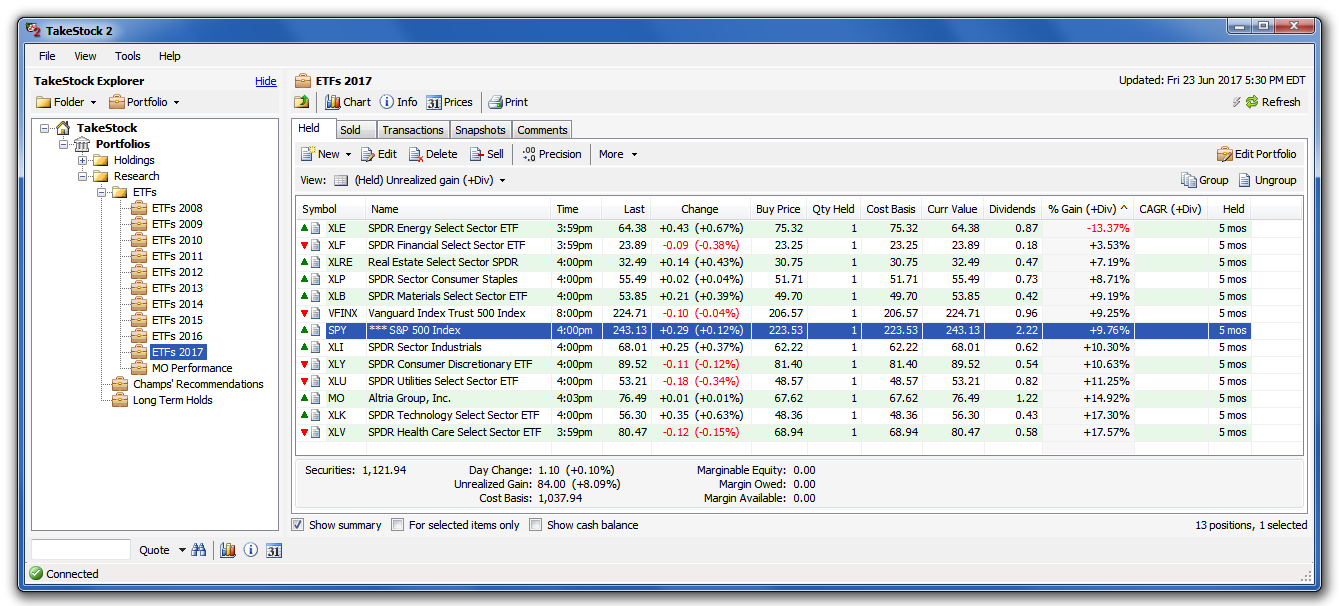 Features: • Track stocks, ETFs and mutual funds • Monitor dividends, capital gain distributions, cash flow and margin loans • View price charts and historical prices • Retrieve company information and delayed quotes • Set target buy and sell price alerts • Identify short and long term gains • Create folders and multiple portfolios • View held and sold positions • Export portfolio information to CSV • Standard and portable installation options • Keeps financial data stored locally on your computer • Supports multiple international home markets including Argentina, Australia, Brazil, Canada, France, Germany, India and the United States • 100% free with no advertising, nag screens or registration Supported operating systems: • 64-bit Windows 7, Windows 8, Windows 10, Windows 11 Supported languages: English Changes: v2.0 R78 09-10-26 Bug fixes: Issue #299, Reported 2026.06.10 by Ravi Bhavnani Clicking the Find button in the Find Positions window displays the message “The portfolio does not exist.” after presenting the search results. Issue #302, Reported 2026.07.06 by Maxwell Moon Historical prices for the symbol SPHIX cannot be retrieved. Issue #306, Reported 2026.08.18 by NB The Held tab of the Find Positions window includes sold positions, and the Sold tab is always empty. Issue #307, Reported 2026.08.26 by Vijay Idnani The AMFI (Association of Mutual Funds in India) symbol finder no longer works and the application is unable to retrieve current values of AMFI securities. Issue #308, Reported 2026.09.10 by Ravi Bhavnani The application crashes when the Auto calculate quantity link in the Add Position or Edit Held Position windows is clicked when the windows contain an unrecognized symbol. No data loss occurs. Note: This file has one hit on VirusTotal. We have confirmed this to be a false positive. The file is safe. This download is for the Windows Portable version (very bottom of page). All other download assets are below: Other Windows: TakeStock2.msi Click here to visit the author's website. Continue below for the main download link. |
||||||||
| Downloads | Views | Developer | Last Update | Version | Size | Type | Rank | |
| 6,819 | 14,861 | Ravi Bhavnani | Sep 14, 2026 - 12:34 | v2.0 R78 | 9.8MB | ZIP |  , out of 96 Votes. , out of 96 Votes. |
|
| File Tags | ||||||||
| portfolio TakeStock tracker investments stocks ETFs dividends mutual funds finance quotes charts Windows freeware | ||||||||
Click to Rate File Share it on Twitter → Tweet
|


