|

|
Processed through Paypal No account required. |








Buy our over-priced crap to help pay the bills.



|
|
Processed through Paypal No account required. |
| File - Download ImageUSB v1.5.1007 | ||||||||
| Description | ||||||||
|
Always scroll to the bottom of the page for the main download link. We don't believe in fake/misleading download buttons and tricks. The link is always in the same place. ImageUSB v1.5.1007 A free utility which lets you write an image concurrently to multiple USB Flash Drives. Capable of creating exact bit-level copies of USB Flash Drive (UFDs), ImageUSB is an extremely effective tool for the mass duplication of UFDs. ImageUSB also supports writing of an ISO file byte by byte directly to an USB drive (*). ImageUSB can also be used to install OSFClone to a USB Drive for use with PassMark OSForensics™. 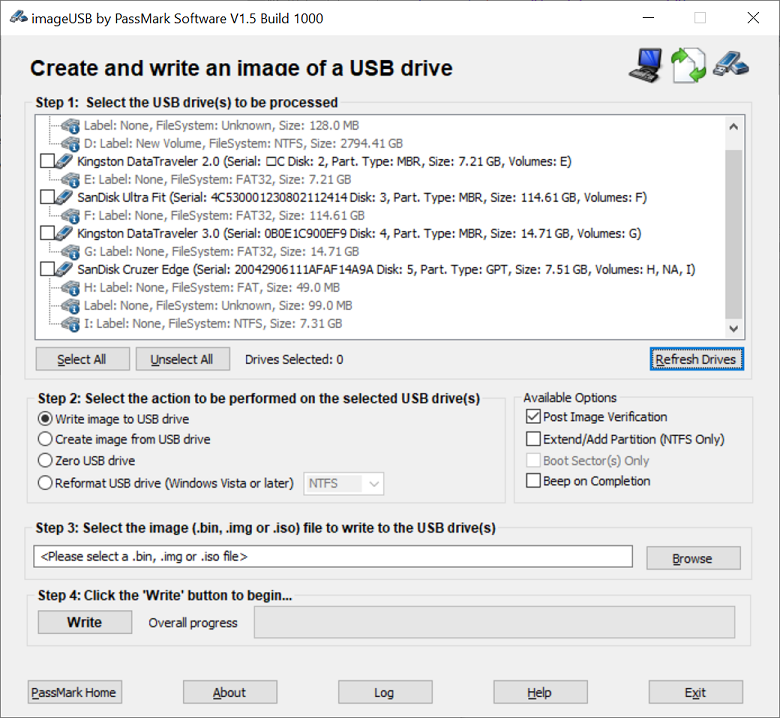 Unlike other USB duplication tools, ImageUSB can preserve all unused and slack space during the cloning process, including the Master Boot Record (MBR). ImageUSB can perform flawless mass duplications of all UFD images, including bootable UFDs. imageUSB includes functionality to Zero a USB Flash Drive. This will replace the contents of the entire drive with 0s. Or alternatively to just Zero the MBR and/or GPT entries that exists on the drive. In addition, imageUSB has the ability to reformat even hard to format drives and reclaim any disk space that may be lost previously. (*) CD ISO images use a different file systems compared to USB drives. So the direct imaging of ISO9660, Joliet or UDF file system, from a CD, to a USB drive, might not allow the USB drive to function in all operating systems. A reformat can recover the drive however. As of V1.5, imageUSB now supports extraction of ISO contents onto USB Drive. Warning: Due to the forensic nature of image duplication by ImageUSB, please ensure that you select UFDs with a storage size similar to the image you wish to duplicate. For example, if a 2GB image is copied to an 8GB USB Flash Drive, the drive will only be able to use two out of the eight gigabytes of storage space. In this scenario, users will need to reformat the UFD in order to access the rest of the storage space. Installation Instructions: Download ImageUSB.zip from the link above and extract the contents of the archive to a directory of your choosing. To start using ImageUSB, double click on the ImageUSB.exe application. Supported operating systems: Windows 7, Windows 8, Windows 10 and Windows 11 Changes: v1.5.1007 04-08-25 -Fixed a bug when writing ISO files to USB drives that incorrectly identified themselves as fixed drives instead of removable drives. (Kingston Type-C 256GB+ was the only known drive with this issue) Click here to visit the author's website. Continue below for the main download link. |
||||||||
| Downloads | Views | Developer | Last Update | Version | Size | Type | Rank | |
| 6,747 | 17,867 | Passmark Software | Dec 16, 2025 - 12:16 | 1.5.1007 | 2.3MB | ZIP |  , out of 84 Votes. , out of 84 Votes. |
|
| File Tags | ||||||||
| ImageUSB v1.5.1007 | ||||||||
Click to Rate File Share it on Twitter → Tweet
|


